


A fasting app with a calorie counter keeps two records in one place: when you ate (your fasting window) and what you ate inside it (calories and macros). Most fasting apps now log food too, but they differ a lot in how you add a meal, which parts sit behind a subscription, and whether the food log and the fast share one screen and one wrist.
This guide explains how the two kinds of tracking fit together, what to check before you pay, and how five apps compare on the US App Store as of 16 November 2026. Zen Lean is our app. It puts the fasting timer, a full food diary, water, sleep and recovery side by side on iPhone and Apple Watch. It is a tracking tool: it does not tell you whether or how to fast, and neither does this article.
Why people track fasting and calories in one app
A fasting timer answers “when”. It says nothing about what happened during the eating window, and that is the part many people want to see. Two well-known randomized trials compared an eating window with other approaches: a 12-month trial in the New England Journal of Medicine gave both groups the same calorie limits, with and without a time window, and the 12-week TREAT trial compared a 16:8 window with three set meals a day. In both, the window by itself did not outperform the comparison group on weight.
There is also a plainer reason: writing things down helps you see them. A systematic review of self-monitoring covering 22 studies found a consistent link between keeping a food record and weight loss in the studies it covered. The research says nothing about which app to use. It does say that a record you actually keep beats a perfect plan you do not.
Two separate apps can do the job, but they do not talk to each other. Apple Health has no fasting data type, so a fast in one app cannot appear next to meals from another. Our guide to whether Apple Watch can track intermittent fasting shows exactly what Health stores and what it leaves out. One app with both logs removes the gap.
What a good fasting app with a calorie counter does
We read the listings that rank for this search, and nearly all of them are App Store pages making the same promise. These are the questions that actually separate them.
- Several ways to log a meal: photo, barcode, search, typing it in, and describing it in words for home cooking that has no label.
- Editable estimates. A photo estimate is a guess; you should be able to fix the portion of each ingredient, not only the total.
- Macros beyond calories, against targets you set yourself rather than a fixed ratio.
- A way to see the fast and the food together, so a day reads as one record.
- Clear limits: which features are free, which are paid, and any daily cap on AI features.
- Apple Watch support if you want to check the fast without your phone.
Logging a meal: photo, barcode, words or by hand
In Zen Lean you can take a meal photo for an AI estimate of calories and macros, describe what you ate in plain words, scan a barcode, search, or enter the meal yourself. Whatever route you take, the meal opens as a list of ingredients you can correct one line at a time. Photo analysis is limited to 10 meal photos a day, including for subscribers.
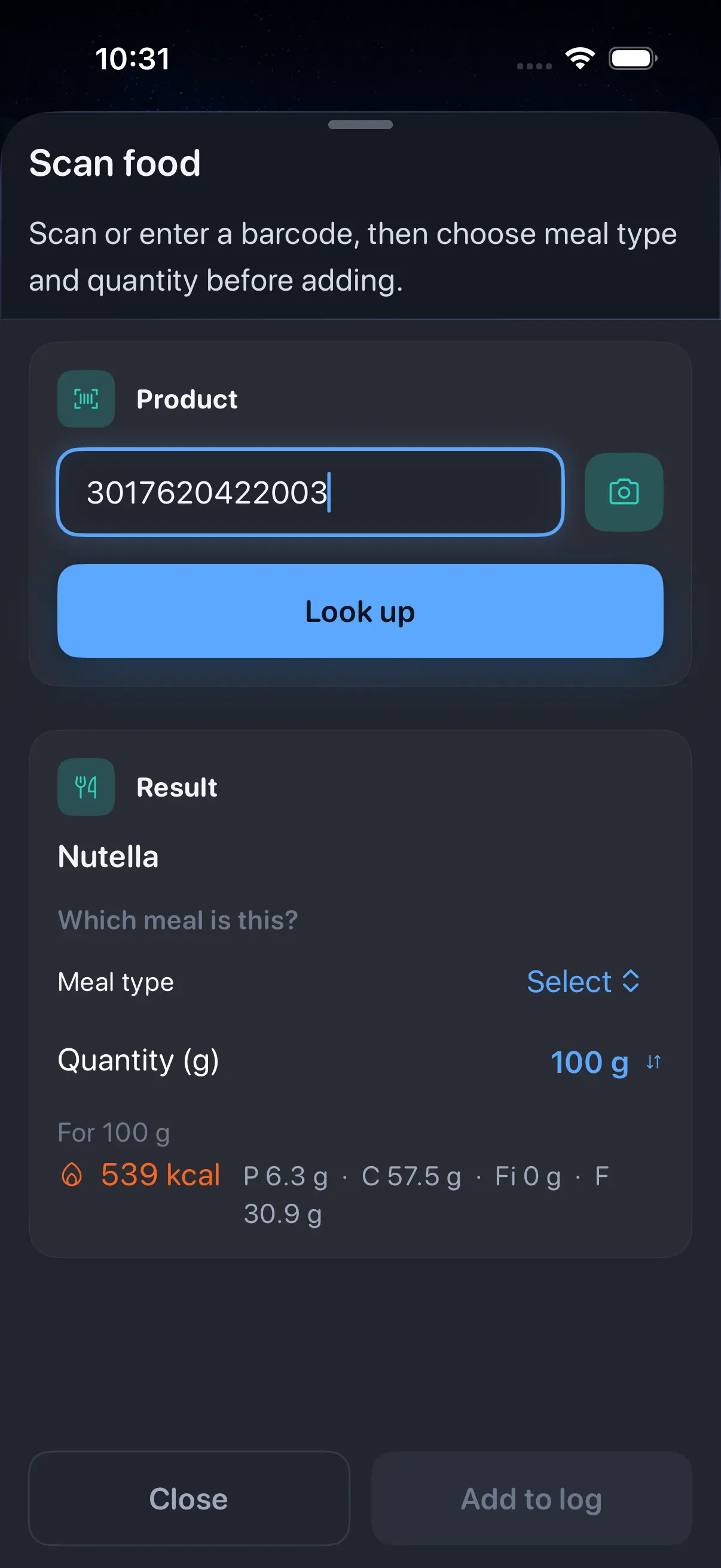
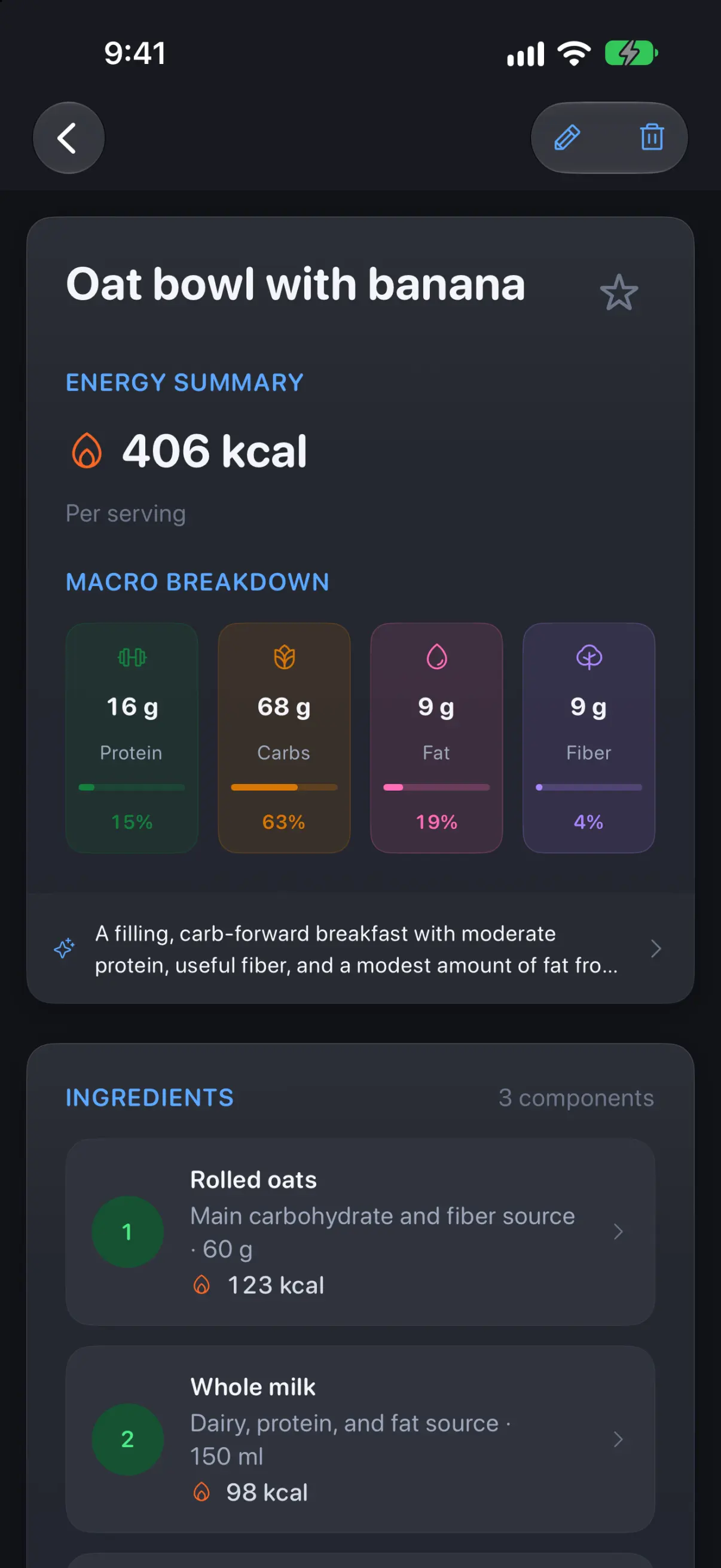
Treat any photo estimate as a first draft. Zero, one of the biggest fasting apps, wrote in its August 2026 update that its own data showed photo logging “was sometimes overestimating calories” before it changed models. That is an honest account of a problem every photo estimator shares: a camera cannot see the oil in a pan or the size of a bowl. Our food diary walkthrough shows how to check a first entry before you trust it.
Calories and macros against your own targets
Zen Lean tracks calories plus protein, carbohydrate, fat and fiber. Under Goals and macros it shows a daily calorie target shaped by your goal, weight and activity, split into grams of each macro, and the pencil icon lets you change it. Many people set these numbers with a doctor or a registered dietitian; the app keeps the score against whatever you settle on.
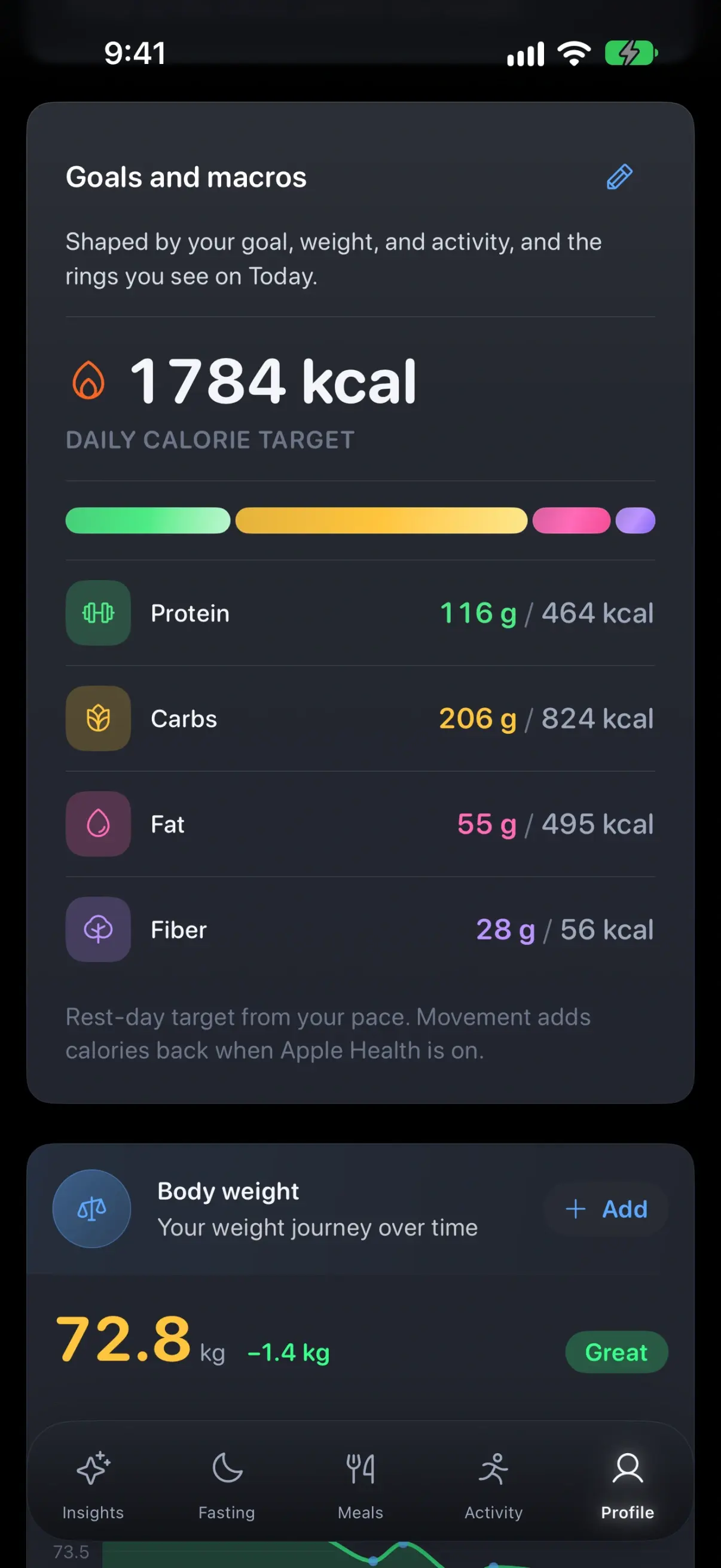
A budget that grows when you move
The card in that screenshot carries a short note: the target is for a rest day, and movement adds calories back when Apple Health is on. So a day with a long walk earns a larger budget than a day at a desk. Most calorie apps offer some version of this, and it is worth knowing how rough the input is.
A Stanford study of seven wrist-worn devices found that none estimated energy expenditure with an error below 20 percent, although Apple Watch had the lowest overall error of the group. Heart rate was far more accurate than calories burned. Read the bonus as an estimate that points the right way, and look at trends across weeks rather than a single day.
The fasting window next to the food
Fasting and Meals sit next to each other in Zen Lean’s tab bar. Pick a preset (16:8, 18:6, 20:4 or one meal a day) or set your own schedule, start the fast, and the Fasting tab shows the time remaining, when it started and when the eating window opens. The Insights tab carries the fast in progress alongside the day’s nutrition summary, so one scroll covers both records.
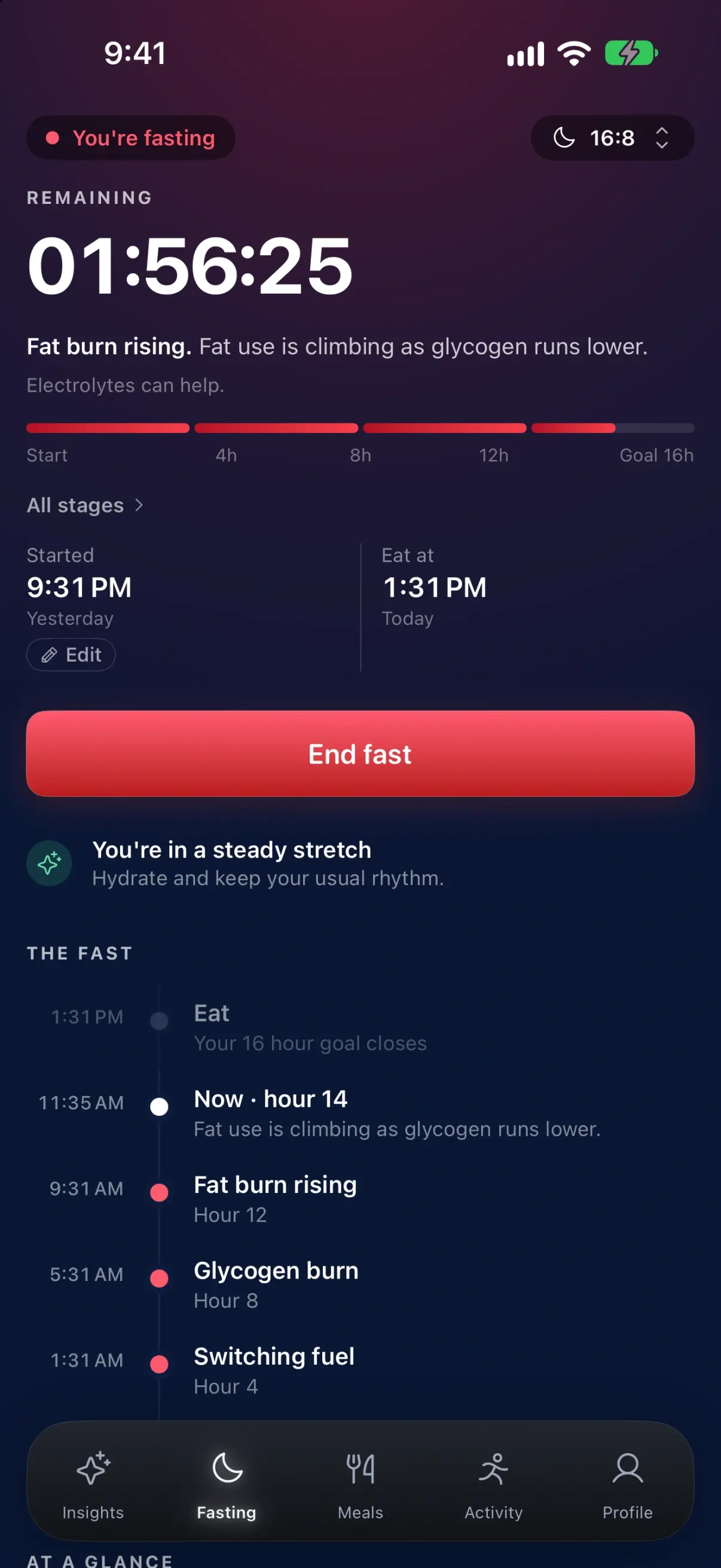
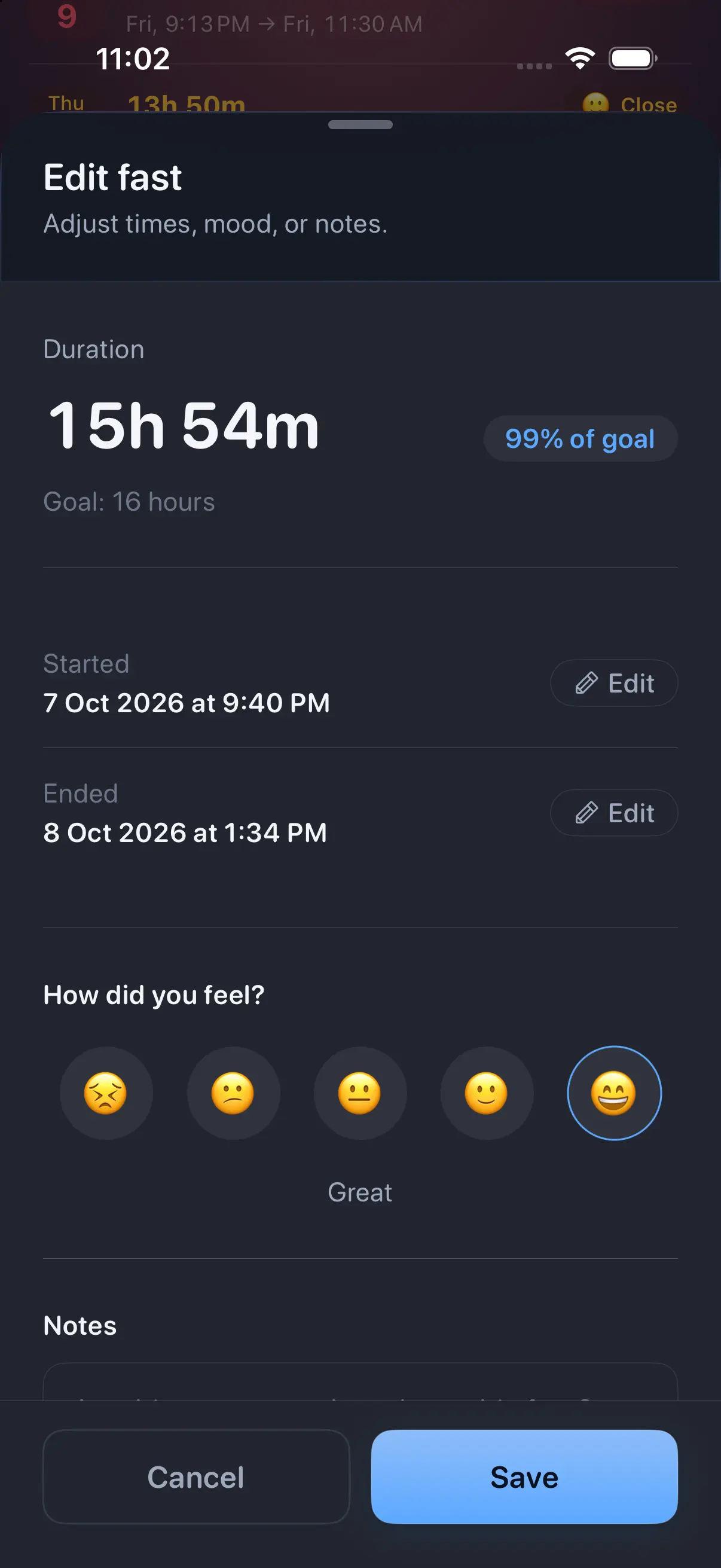
Real days are messy, so editing matters as much as the timer. If you forgot to start a fast at dinner, change the start time afterwards. Each finished fast can carry a mood rating and a note, and the morning check-in asks how your energy, body and mood feel. That gives you a record of how a routine felt, next to the numbers.
Around the two main logs, Zen Lean reads sleep, activity and heart data from Apple Health (or from a Fitbit through Google Health, currently in beta), keeps a water log with Home Screen and Lock Screen widgets, and can write the meals you log back to Apple Health if you switch that on. The Apple Watch app lets you check your day, follow a fast and track supported workouts.
Five fasting apps with a calorie counter, compared
We read each app’s current US App Store listing on 16 November 2026, plus MyFitnessPal’s own Premium comparison page. Several listings show many in-app purchase prices without labeling the plan length, so we quote the range. Confirm the price on the subscription screen before you pay.
Scroll sideways to compare every column.
Sources: each app’s US App Store listing, Zero’s August 2026 blog post and MyFitnessPal’s Premium page. Prices and ratings as of 16 November 2026.
| App | Food logging | What is paid | Apple Watch | Account |
|---|---|---|---|---|
| Zen Lean (ours) | Photo (10 a day), describe, barcode, search, manual; calories, protein, carbs, fat, fiber | Free download; subscription or eligible trial needed after onboarding (monthly or yearly) | Yes | Required |
| Zero | Photo meal logging with Zero Plus; first meals free | Timers free; Zero Plus listed from $9.99 to $89.99 | Yes | Not stated |
| Fastic | Photo food scanner and calorie tracker | Fastic Plus for full access; e.g. 1 month $14.99, 3 months $27.99 | No Watch app listed | Not stated |
| MyFitnessPal | Search of 20.5 million foods; barcode and meal scan need Premium | Fasting tracker needs Premium; prices shown in the app | Yes | Not stated |
| Intermittent Fasting Tracker (Leap) | AI food scanner, barcode, macros; advanced tracker and custom calorie targets are premium | Free core; OMAD and custom schedules premium; listed from $2.99 to $49.99 | Yes | Not required |
Ratings on the US store that day: MyFitnessPal 4.7 from about 2.39 million ratings, Zero 4.8 from about 445,000, Fastic 4.8 from about 246,000, and Leap’s tracker 4.9 from about 29,000. Zen Lean is new and has no US ratings yet. Full listings: Zero, Fastic, MyFitnessPal (and its Free vs Premium table), and Leap’s Intermittent Fasting Tracker.
Which one fits
- You want the fast, a full food diary with fiber, water, sleep and recovery in one app and on your wrist, and you are fine paying for it: Zen Lean.
- You mainly want a free fasting timer and only an occasional photo log: Zero, whose timers, streaks and trends are free.
- You already keep years of food history in MyFitnessPal: its Premium plan adds a fasting tracker to the diary you have.
- You want a free start with no account: Leap’s tracker, keeping in mind that custom schedules and calorie targets are premium.
- You do not wear an Apple Watch and want recipes and courses: Fastic.
If the Watch side matters most to you, our roundup of the best fasting apps for Apple Watch goes deeper on what each app can do from the wrist.
What Zen Lean costs and what needs an account
The plain terms, so nothing surprises you after download. Zen Lean is free to download, and an active subscription or eligible trial is required to use the app after onboarding. Monthly and yearly plans are shown on the subscription screen with current prices and any trial. It runs on iPhone (iOS 17 or later) with an Apple Watch app; there is no iPad version.
An account is required, using Sign in with Apple, Google or an email address. Meals, weight, water and fasting records sync through it, so your history follows you to a new phone. AI meal analysis, barcode lookup and connected health services use external services when you use those features, and optional usage analytics can be turned off in Settings. The Zen Lean privacy policy lists every category, and the data page explains export and deletion.
Set up fasting and calorie tracking in Zen Lean
- Install Zen Lean from the App Store, create your account and review the subscription screen.
- Allow Apple Health access for the categories you want. Activity makes the calorie budget move with your day; sleep and heart data feed the recovery readings.
- Open Profile, then Goals and macros, and check the calorie and macro targets. Change them to the numbers you and your clinician chose.
- On the Fasting tab, pick a preset or set your own schedule, and start your first fast.
- When the eating window opens, log your first meal the quickest way you can: barcode for packaged food, a description or photo for a cooked plate. Open the meal and fix any portion that looks wrong.
- Over the next two weeks, answer the morning check-in. The app notes it needs about two weeks of mornings before it compares how you feel with overnight recovery.
Zen Lean supports personal awareness and self-tracking. It is not a medical device and does not diagnose or treat anything. See every screen on the Zen Lean app page, and talk to your doctor before you change your diet or fasting routine.