


Not on its own. You can track intermittent fasting on Apple Watch only with a third-party app: as of iOS 27 and watchOS 27, Apple ships no fasting timer, no fasting ring and no fasting data type in Health. What Apple Watch and the Health app do record is the data around a fast, such as sleep, activity, heart rate, weight and any food entries an app writes in.
This guide shows exactly what Health stores, how fasting apps use the Watch to fill the gap, and how four popular options compare as of 14 November 2026. We make one of them, Zen Lean, which puts food, sleep and recovery next to the fasting timer on iPhone and Apple Watch.
The short answer: no built-in fasting ring
We checked Apple’s own material for the current releases. Apple’s September 2026 health and fitness announcement for iOS 27 and watchOS 27 covers a new Insights tab, a Longevity tab, Movement Evaluations, lab ordering, Cycle Tracking for perimenopause and menopause, and Workout Buddy. It announces nothing for fasting, eating windows or meal logging. The iOS 27 update notes, up to iOS 27.2.1, add no fasting feature either.
The developer side confirms it. HealthKit, the framework every health app writes through, publishes its full list of data types. None of them describes a fast: there is no start time, end time or fasting window that an app could save and Health could chart.
One iOS 27 change sits close to the topic. Siri mode in the Camera app can look up nutritional info for a plate of food. Apple does not describe it as a food log or a fasting tool, so it does not change the answer.
What Apple Health does record that matters for fasting
Health is a store for data from iPhone, Apple Watch, compatible apps and devices, plus what you type in yourself. Apple’s iOS 27 guide to Health data lists what each source contributes. These are the parts most people want next to a fasting routine.
Scroll sideways to compare every column.
Sources: Apple’s iOS 27 Health guide and HealthKit documentation. Fasting windows have no row because Health has no place to store them.
| Data in Health | Where it comes from | Useful next to a fast because |
|---|---|---|
| Sleep duration, stages and sleep score | Apple Watch worn overnight; iPhone estimates time in bed if you set a sleep schedule | Many fasts start in the evening and run through the night |
| Overnight vitals: heart rate, respiratory rate, wrist temperature, blood oxygen | Apple Watch, in the Vitals app | Shows how a night looked against your own typical range |
| Steps, exercise minutes, active energy | iPhone and Apple Watch | Puts activity on the same day as the eating window |
| Weight and body measurements | Typed in by you, or written by a smart scale or app | A trend line, read over weeks |
| Nutrition: dietary energy, protein, carbohydrate, fat, water and more | Typed in by you, or written by a food-logging app | Shows what you ate inside the eating window |
| Fasting start, end or window | No source: HealthKit has no fasting type | This is the gap a fasting app fills |
Two details from Apple are worth knowing. The sleep score is built from how long you slept, how consistent your bedtime was and how often you woke, and it appears about 15 minutes after you wake. And when two sources record the same thing, such as weight from a scale and from an app, Health uses the source at the top of its list. You can reorder that list under Data Sources & Access.
How fasting apps use the Watch: start, stop, glance
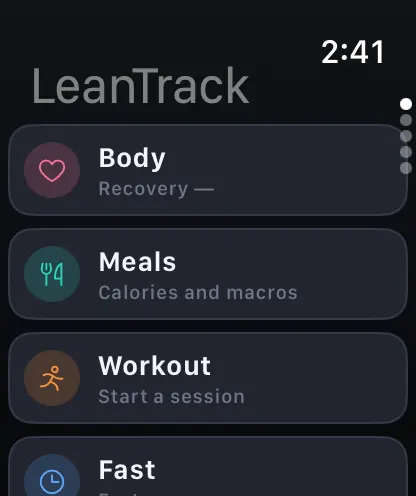
A fasting app on Apple Watch does three jobs. It shows the timer and how much of your goal is left, it puts that progress on the watch face so you can see it without opening anything, and in some apps it lets you start, end or edit a fast from the wrist.
Apps differ most on that third job, so read the listing closely. Zero’s August 2026 Watch update lets you start a fast, end it, edit the start time, change the goal and delete a mistaken fast from the wrist, for everyone. Fasty’s listing says you can start and finish fasts, change your goal and check status on the Watch, free. Fastic’s listing shows no Apple Watch app at all in its compatibility section.
Four fasting apps with Apple Watch support, compared
We picked apps people search for alongside “fasting app Apple Watch” and read each current US App Store listing on 14 November 2026. Prices change and the store does not label every plan, so treat these as a starting point and confirm in the app before you pay.
Scroll sideways to compare every column.
From each app’s App Store listing and, for Zero’s Watch features, its own blog. Prices and ratings as of 14 November 2026.
| App | Apple Watch | Food logging | Price model | Account |
|---|---|---|---|---|
| Zen Lean (ours) | Yes: follow a fast, check your day, track supported workouts | Meal photo estimate (10 a day), describe, barcode, search, manual | Free download; subscription or eligible trial required after onboarding (monthly or yearly) | Required |
| Zero: Fasting & Food Tracker | Yes (watchOS 10+): start, end, edit, change goal | Photo meal logging with Zero Plus; first meal logs free | Free timers, streaks and trends; Zero Plus subscription, listed from $9.99 to $89.99 | Not stated in the listing |
| Fastic: Weight Loss & Fasting | No Apple Watch app listed | Food scanner from a photo, calorie tracker | Fastic Plus subscription, e.g. 1 month $14.99, 3 months $27.99 | Not stated in the listing |
| Fasty (Intermittent Fasting Tracker) | Yes (watchOS 10+): start, finish, change goal, free | None listed: fasting only | Free core; Basic $0.99/mo or $4.99/yr, Pro $6.99/mo, $19.99/yr or $49.99 once | Not required |
Ratings on the US store that day: Zero 4.8 from about 445,000 ratings, Fastic 4.8 from about 246,000, Fasty 4.9 from about 52,000. Zen Lean is new and has no US ratings yet. Simple, once a common fasting pick, now lists itself as an AI weight loss coach and its description no longer mentions fasting, so we left it out.
Which one fits
- Only want a timer on your wrist, free, with no account: Fasty is the most direct fit, and it exports to CSV.
- Want full start, end and edit control from the Watch plus a large free tier: Zero.
- Do not wear a Watch and want coaching content and recipes: Fastic, which is iPhone-only.
- Want the fast next to meals, macros, water, sleep, recovery and a morning check-in, on iPhone and Watch, and are fine paying: Zen Lean.
Fasting next to sleep and recovery data
The reason to track a fast on a Watch, instead of a kitchen timer, is context. A 16-hour fast that started at 9 p.m. spends most of its hours asleep, so the night is part of the record. If your Watch already writes sleep and heart data to Health, a fasting app with read access can show the two on one screen.
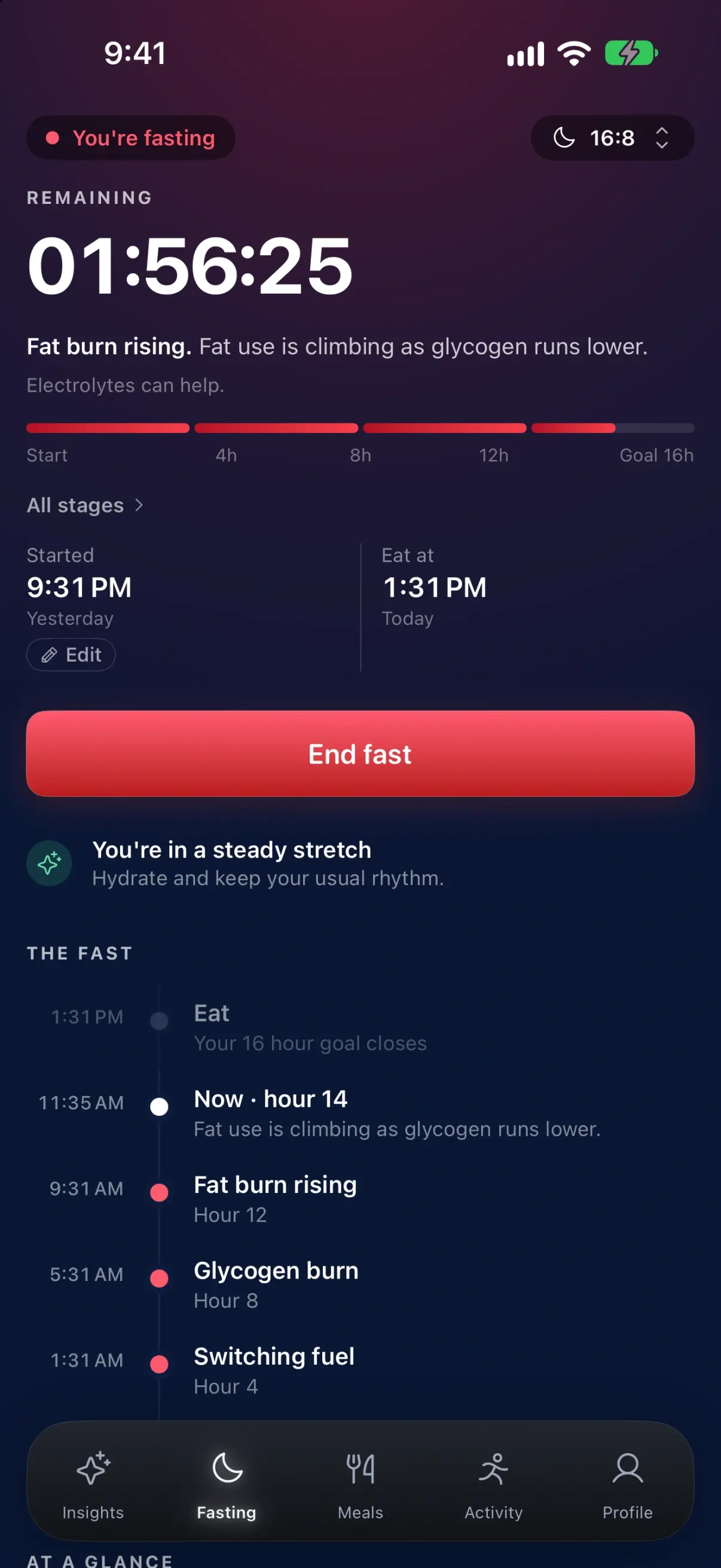
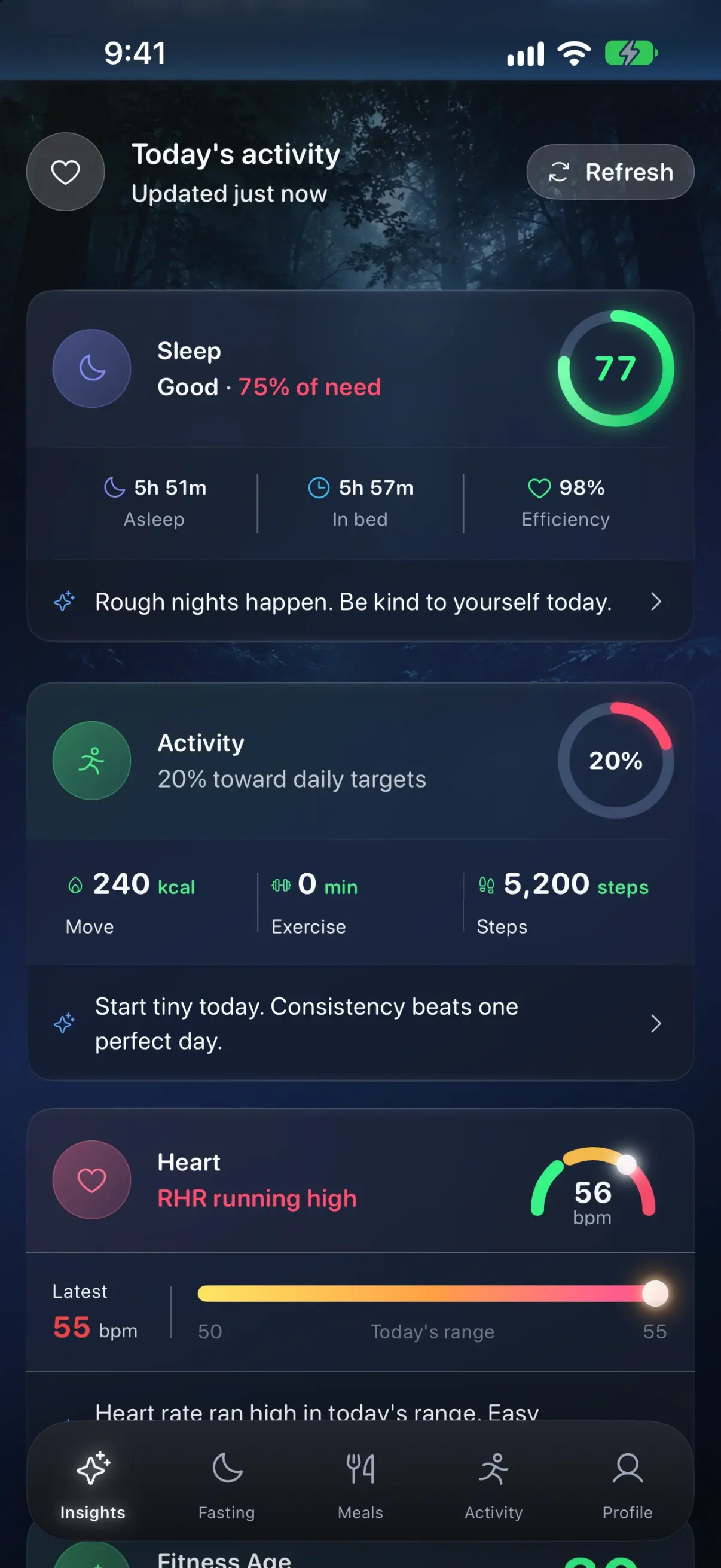
Read these numbers as a diary. One short night or one high resting heart rate tells you little; patterns over weeks are what tracking is good for. If something in your data worries you, take it to your doctor.
Setting it up with Zen Lean (Watch app plus Health permissions)
Before you download, the plain terms: Zen Lean is free to download, but an active subscription or eligible trial is required to use it after onboarding, and an account is required. Monthly and yearly plans are shown on the subscription screen with current prices. Google Health, which is how a Fitbit connects, is in beta.
- Install Zen Lean on your iPhone from the App Store. It needs iOS 17 or later. The Watch app comes with it; if it does not appear on your Watch, open the Watch app on iPhone and install it from the available apps list.
- Create your account with Sign in with Apple, Google or an email address, then review the subscription screen.
- When asked, allow Apple Health access. Turn on only the categories you want. Zen Lean reads weight, workouts, steps, active energy, sleep, heart rate, heart rate variability, respiratory rate and blood oxygen, and can write the meals you log back to Health if you switch that on.
- Optional: connect Google Health (beta) to bring in what a Fitbit recorded. It is read access only.
- On the Fasting tab, pick a preset (16:8, 18:6, 20:4 or OMAD) or set your own schedule, then start the fast.
- Raise your wrist to follow it. The Watch app shows a copy of your day from your iPhone, including the fast, and records workouts with the Watch’s own sensors.
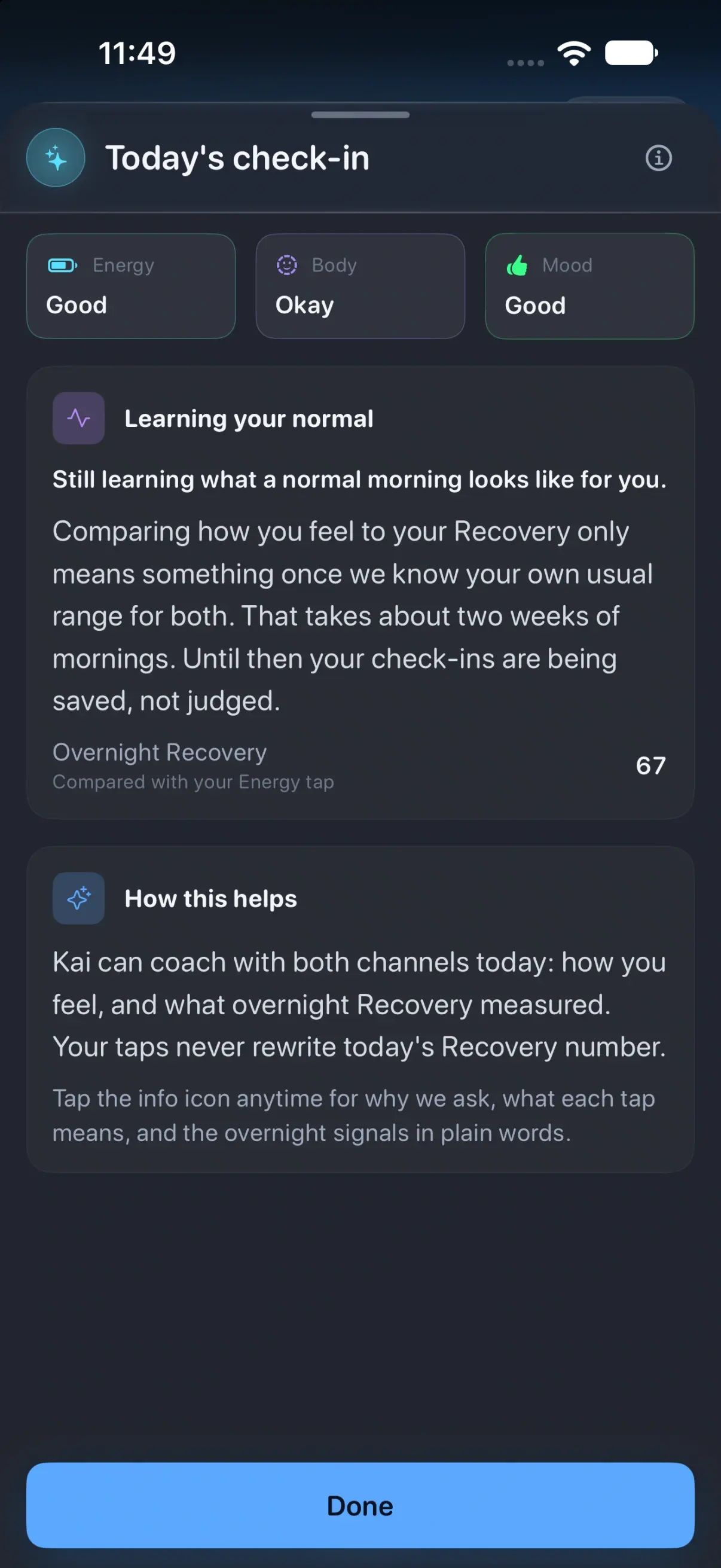
- Each morning, the check-in asks you to rate energy, body and mood, so you have a record of how the routine felt next to the numbers.
Food logging uses the same account: a meal photo for an AI estimate (10 photos a day, including for subscribers), describing a meal, scanning a barcode or searching. Our food diary guide for iPhone walks through a first entry and how to check an estimate before saving it.
What Zen Lean does not do: its listing promises that you can follow a fast and check progress from the Watch. If starting and ending fasts on the wrist without touching your phone is the main thing you want, Zero and Fasty state that capability explicitly.
Privacy: what you share, and how to revoke it
Every fasting app that touches Health asks per category, and you can say yes to some and no to others. Zen Lean is not an on-device-only app: meals, weight, water and fasting records sync through your account, and meal photo analysis, barcode lookup and connected health services use external services when you use them. The Zen Lean privacy policy says HealthKit data is not used for advertising or marketing.
- To change what any app can read or write, open the Health app, tap your profile picture, then Apps under Privacy, choose the app and switch categories off.
- For Zen Lean you can also go to Settings, Privacy & Security, Health, Zen Lean.
- Revoking stops new reads. It does not delete what has already synced to your Zen Lean account; delete the account in the app for that. Anything written to Health stays in Health until you delete it there.
Apple’s steps for this are in Manage Health data on your iPhone, iPad, or Apple Watch. If keeping data off any server matters most to you, an app with no account, such as Fasty, is the closer match.
Before you start a fasting routine
Next step
If you want one place for the fast, your meals and your night on iPhone and Apple Watch, see the screens on the Zen Lean app page and check the current terms on the App Store. If you only need a timer, the Zero and Fasty listings are the places to start.