zenproducts  /  head to head  /  reviewed

Zen Passwords vs Enpass

Ten rounds against the manager built on the same idea we were: no vendor server, your vault in your own cloud. Enpass takes four, Zen Passwords three.

Zen Passwords

3

rounds won

3

draws

Enpass

4

rounds won

Our scoring, of our own product against a competitor, so read it with that in mind. Every round below says exactly what it was scored on. Facts about Enpass checked against their own published documentation on .

The verdict

Enpass wins four rounds to three, with three draws. It is the closest thing to us on the market, and it does several things we do not.

Most password managers ask you to trust a company with your vault. Enpass does not, and neither do we. Their vault lives in your own storage, whether that is iCloud, Dropbox, Google Drive, a WebDAV server or nothing at all. There is no Enpass server holding your secrets. That is the same architecture we chose, arrived at independently, and it is the right one.

Where they beat us is reach and price. Enpass runs on Windows, Android and Linux as well as Apple devices, and it lets you pick which cloud to sync through rather than assuming iCloud. Its free tier holds 25 items to our five, and it still sells a one time purchase in a category that has almost entirely moved to subscriptions.

Where we beat them is the number that protects the file. Enpass derives your vault key with PBKDF2, at 320,000 rounds of SHA-512, which is a serious setting for a method with no memory cost at all. Ours is Argon2id at up to 256 MB of memory per guess. We also give you a way back in if you forget, and on an Apple device ours is a native app rather than one build of a product that must run everywhere.

What we would actually tell a friend

If you have a Windows PC or an Android phone, or you want to choose your own cloud, or you would rather buy software once than rent it, use Enpass. It is a genuinely well made product built on the same honest idea we were. Take Zen Passwords if your life is entirely on Apple devices and you want the strongest possible cost per guess on the file itself.

The scorecard

All 10 rounds at a glance

Then the same 10 in detail, with what each side actually does and why the round went the way it did.

RoundZen PasswordsEnpassWinner
1. What one guess costs an attackerArgon2id, up to 256 MB of memory per guessPBKDF2-SHA512, 320,000 rounds. No memory costZen Passwords
2. Who holds your vaultNobody. Your own private iCloudNobody. Your own cloud, or no cloud at allDraw
3. Which cloud you get to chooseiCloud, because we are an Apple appiCloud, Dropbox, Google Drive, WebDAV, or local onlyEnpass
4. The devices it reachesiPhone, iPad and MacApple, Windows, Android, Linux and browser add onsEnpass
5. What it costsFive active items free, then Premium25 items free, and a one time purchase optionEnpass
6. What you can actually keep in itSeven kinds plus passkeys, with custom fieldsA large set of templates, with custom fieldsDraw
7. One time codesIn the app, not a separate purchaseIn the app, not a separate purchaseDraw
8. Getting back in when you have forgottenA printable recovery key, plus trusted people who can helpA keyfile, and otherwise no way backZen Passwords
9. Sharing with the people you live withNothingLimited, and not the reason anyone buys itEnpass
10. How it feels on the device you actually holdBuilt with Apple's own tools, for three devices and nothing elseOne app that has to work everywhereZen Passwords
Final3 rounds4 roundsEnpass

Round 1

What one guess costs an attacker

Zen Passwords

Argon2id from the start, with no menu to find. New vaults work out what your phone can afford. They start at 256 MB of memory per guess and step down through 128 and 64, keeping the strongest setting that still unlocks in under a second.

Enpass

PBKDF2 with SHA-512, at 320,000 rounds, according to their own security whitepaper, with the vault itself encrypted using SQLCipher and AES-256. That is a careful, well documented design and a high round count for the method.

Winner

Zen Passwords. Zen Passwords. 320,000 rounds is a respectable number and PBKDF2 is not broken. It simply costs an attacker time and no memory, and memory is the thing a rack of graphics cards is short of. This is the one place where being younger helped us: we started after Argon2 won the argument.
Round 2

Who holds your vault

Zen Passwords

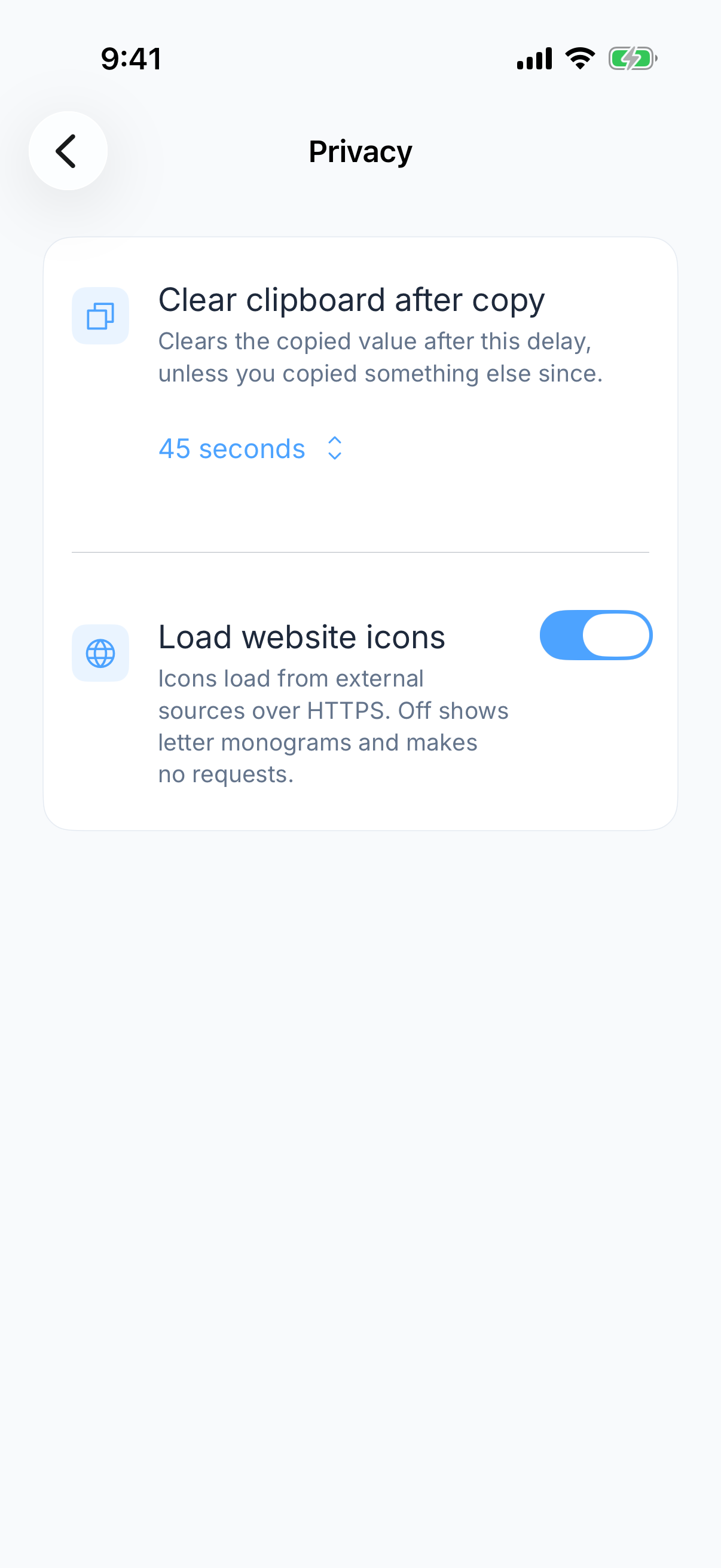
Nobody. It sits in your own private iCloud, on your Apple ID, scrambled so that it means nothing without your password. There is no Zen server.

The Zen Passwords privacy screen, listing what is sealed and what never leaves the device.
The one thing Enpass and we already agree on.

Enpass

Nobody. Your vault sits in whichever storage you point it at, or on the device alone if you point it at nothing. There is no Enpass server.

Draw

Even. Even, and both right. This is the round nearly every other manager in this series loses, and Enpass wins it as squarely as we do. Two products that decided the safest data to hold is none.

Round 3

Which cloud you get to choose

Zen Passwords

iCloud, on your Apple ID. That is the only option, because we are an Apple app and iCloud is the storage every Apple user already has.

Enpass

iCloud, Dropbox, Google Drive, OneDrive, a WebDAV or Nextcloud server of your own, a local Wi-Fi sync, or no sync at all.

Winner

Enpass. Enpass. We made a simplifying choice and they made a flexible one. If you do not want your vault in iCloud, we have no answer for you and they have six.

Round 4

The devices it reaches

Zen Passwords

iPhone, iPad and Mac. No Android, no Windows, no browser add on.

Enpass

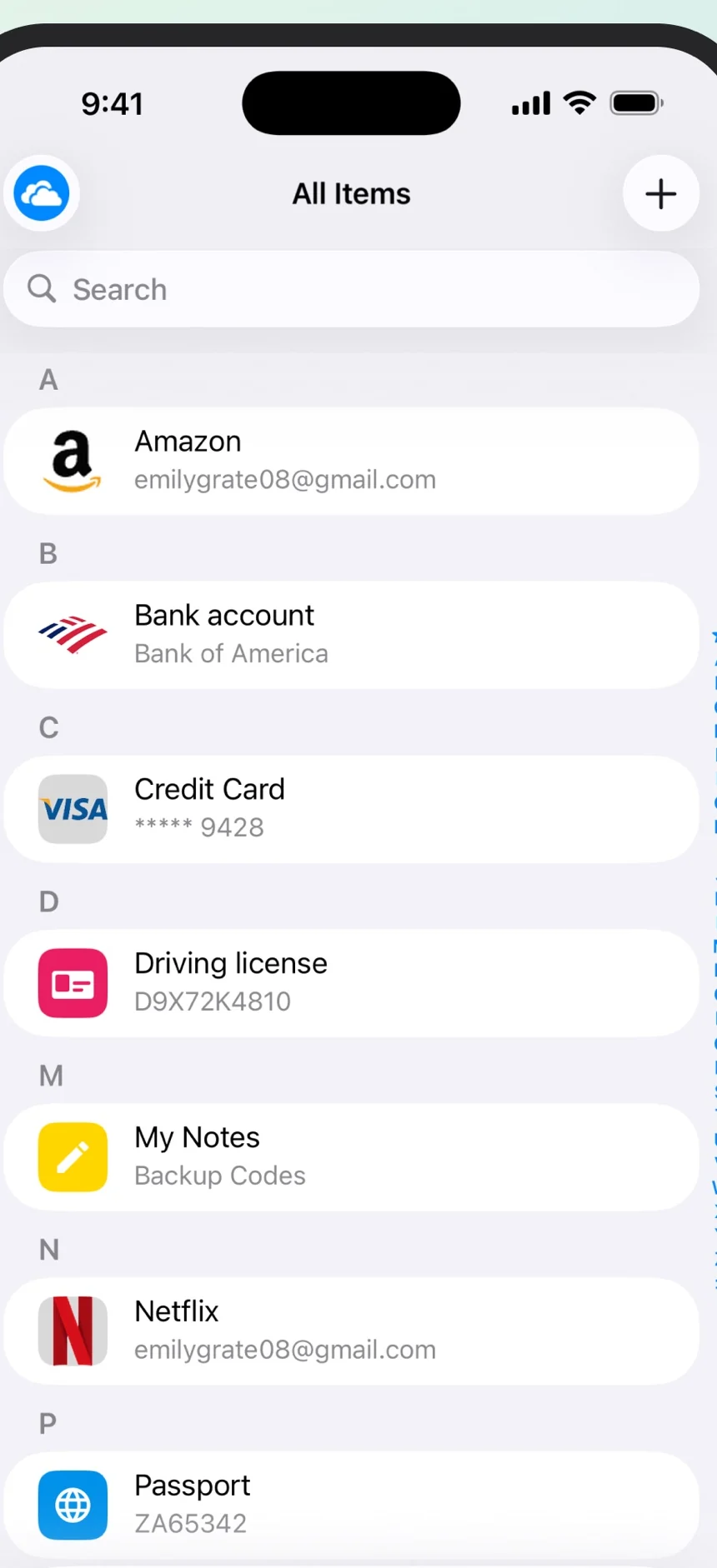
Apple devices, Windows, Android and Linux, with browser add ons.

The Enpass all items list, from Enpass’s own App Store screenshots.
Enpass’s own listing. It runs where we do not.
Winner

Enpass. Enpass. One Windows laptop or one Android phone settles this round.

Round 5

What it costs

Zen Passwords

A free plan that keeps five items fully openable, and you choose which five. Premium beyond that.

Enpass

A free tier holding 25 items, paid individual and family plans, and a one time purchase, which almost nobody else in this category still offers.

Winner

Enpass. Enpass. Twenty five free items beats five, and the option to buy software once rather than rent it forever is a genuine kindness that the rest of the industry has given up on.

Round 6

What you can actually keep in it

Zen Passwords

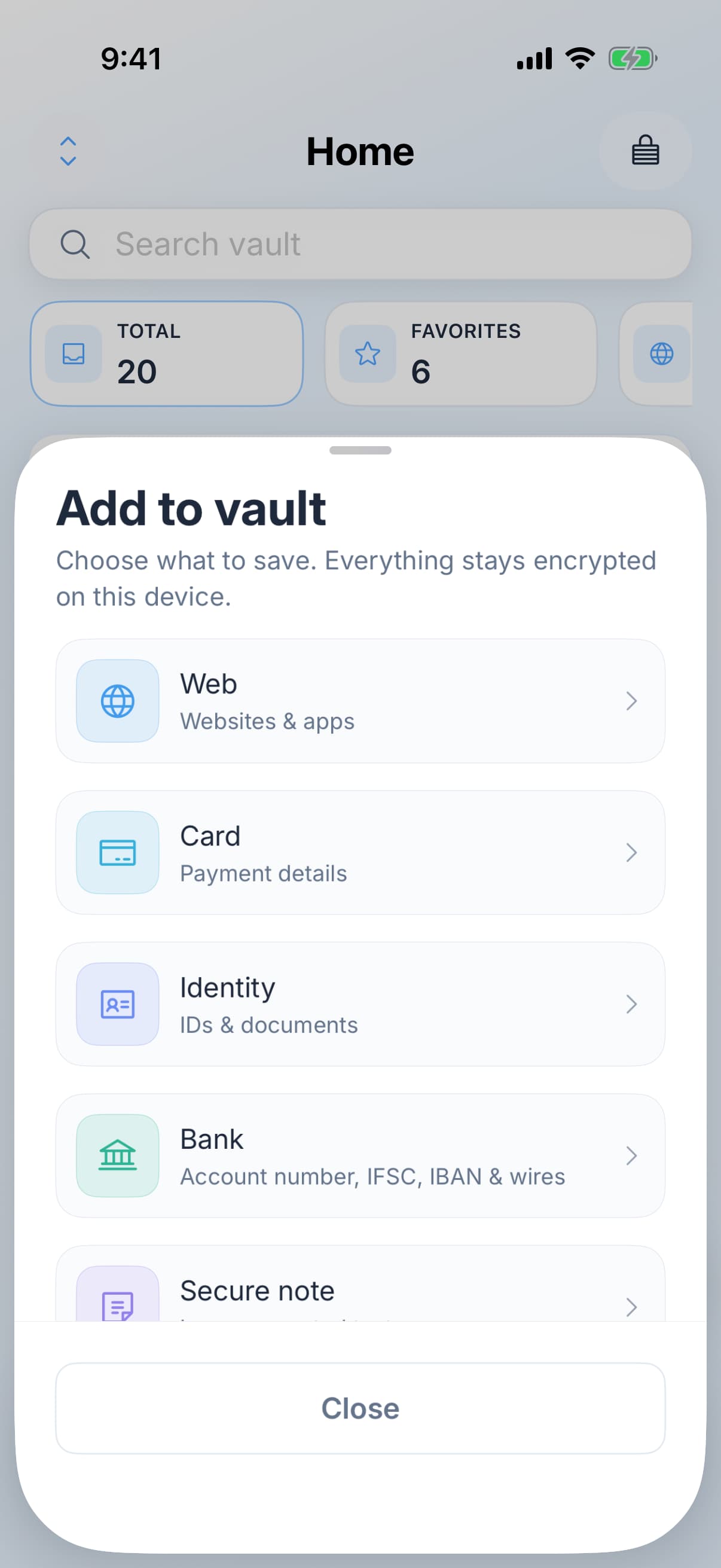
Seven kinds plus passkeys: web logins, cards, bank accounts, identity documents, Wi-Fi, software licences and secure notes, each with custom fields you can add.

The Zen Passwords new item sheet, showing the seven item kinds.
Seven kinds, each with its own fields.

Enpass

A large library of templates covering most of the same ground and then some, with custom fields on top.

Draw

Even. Even. They have more templates. Ours are more opinionated and better fitted to an Apple device. Nothing a normal life contains is missing from either.

Round 7

One time codes

Zen Passwords

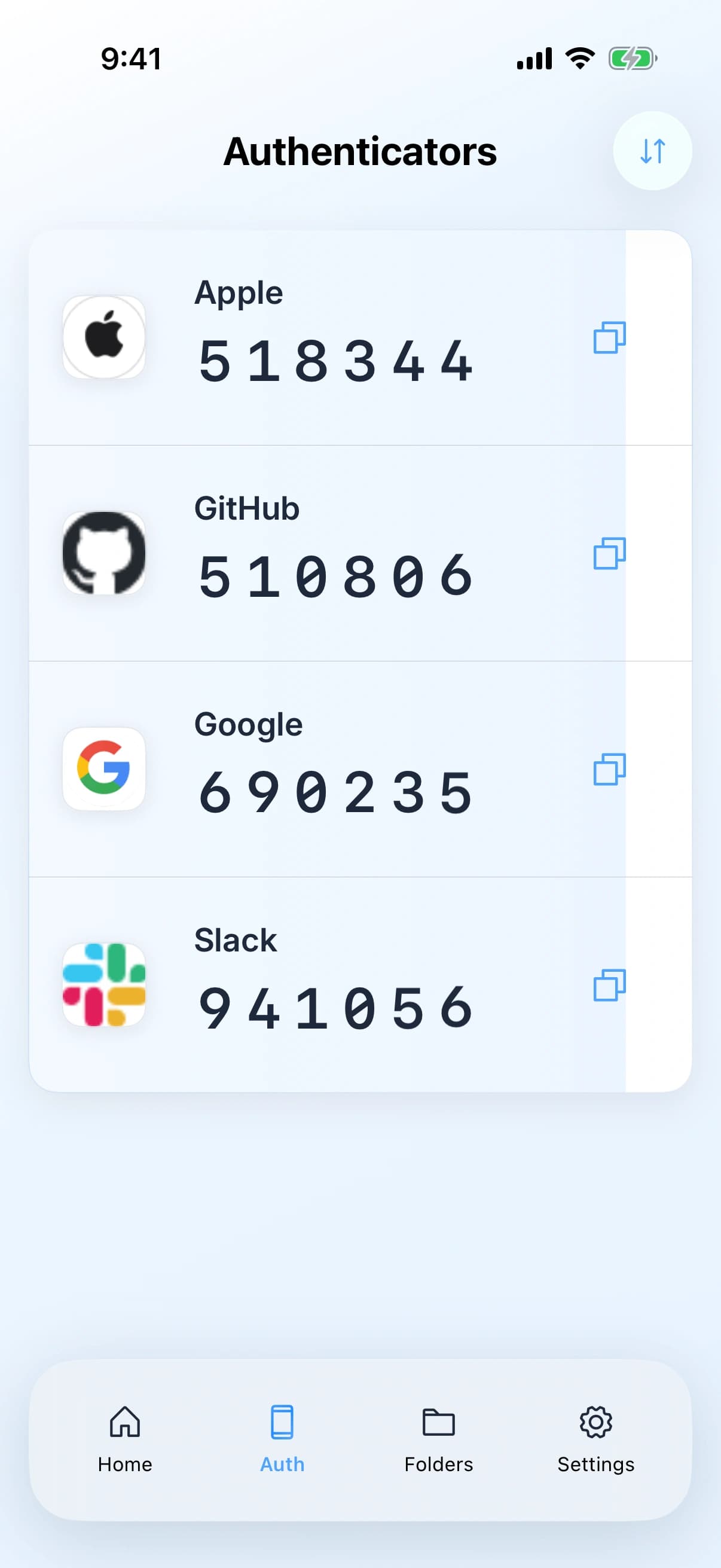
One time codes live on the item they belong to and in their own tab, made in the app, and filled along with the password. Not a separate purchase.

The Zen Passwords authenticator screen with one time codes counting down.
One time codes live beside the login they belong to.

Enpass

Codes are stored and generated alongside the login they belong to, with no separate fee.

Draw

Even. Even, and both of you should be embarrassed for the rest of the category. Two smaller products both include this, while larger rivals charge a yearly fee for it.

Round 8

Getting back in when you have forgotten

Zen Passwords

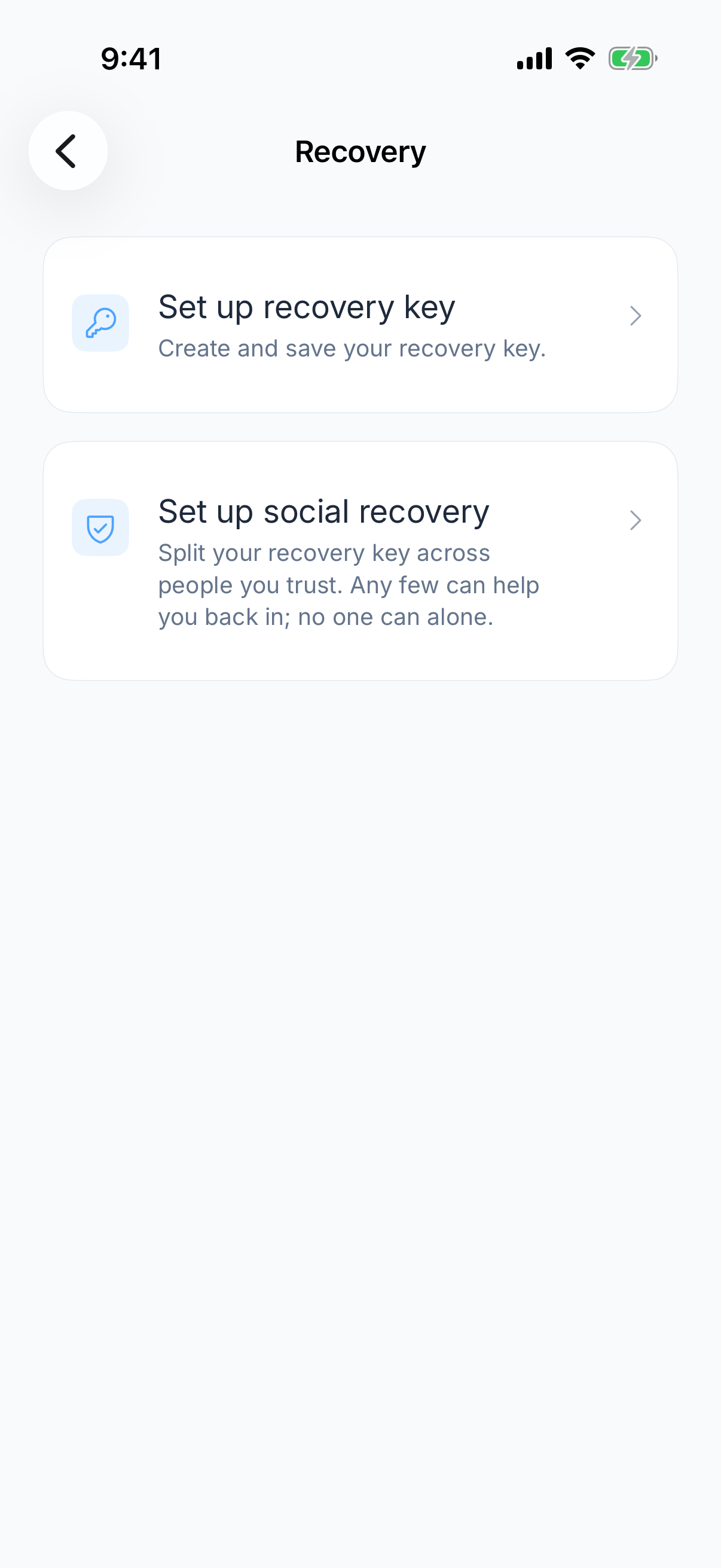
A thirty two character recovery key you can print and keep in a drawer. It leaves out the characters people mix up, so there is no zero, capital O, one or capital I to type wrong. Nobody stores it anywhere, us included. Or you can use social recovery, which splits that key between people you trust. A few of them together can help you back in. None of them can get in alone.

The Zen Passwords recovery screen, offering a recovery key and social recovery.
A recovery key you keep, or people you trust. Never us.

Enpass

A keyfile can be required alongside the master password, which is a second factor rather than a way back in. If the master password is gone and there is no backup, the vault is gone.

Winner

Zen Passwords. Zen Passwords. Not holding your data does not have to mean leaving you no way back into it. A printable recovery key and social recovery cost us nothing in security, and they are the difference between a bad day and a lost decade.

Round 9

Sharing with the people you live with

Zen Passwords

Nothing. Your vault is yours alone.

Enpass

Limited sharing, and not the reason anybody chooses Enpass, but more than nothing.

Winner

Enpass. Enpass, on a low bar. Neither of us is the answer for a family. They are slightly less not the answer than we are.

Round 10

How it feels on the device you actually hold

Zen Passwords

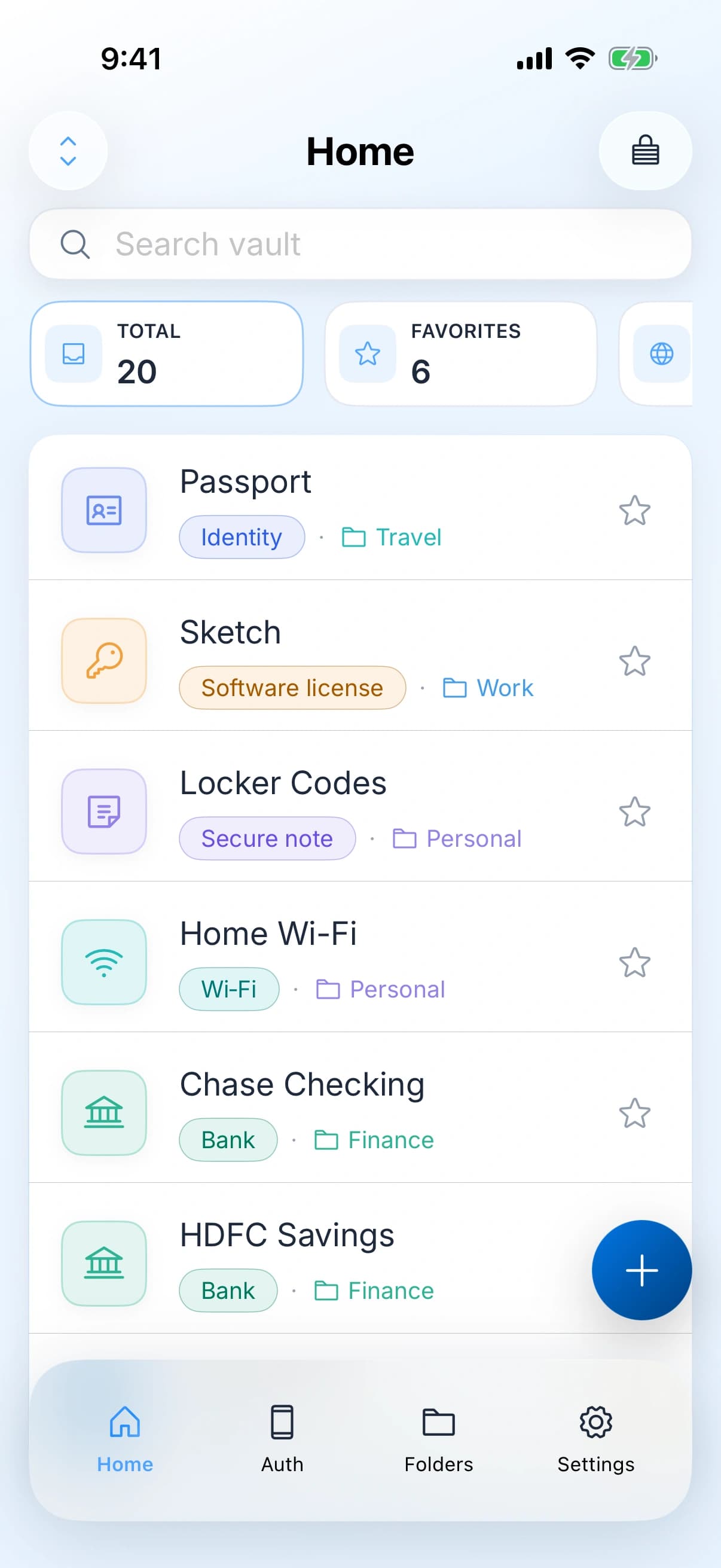
Built with Apple's own tools, for iPhone, iPad and Mac and nothing else. Real Mac menus and a proper sidebar. Panels that slide the way you expect. Make the text bigger in your settings and the whole app lays itself out again properly.

The Zen Passwords home screen on iPhone.
The app itself, not a rendering of it.

Enpass

One product across Apple, Windows, Android and Linux, which means it cannot lean fully on any one system's conventions.

Winner

Zen Passwords. Zen Passwords. Being on one platform is a limitation everywhere except here, where it is the whole advantage. We only have to be right on Apple devices, so we are.

So who should choose what

Choose Zen Passwords

You are all Apple and want the strongest key

  • Every device you own has an Apple logo on it.
  • You want Argon2id at up to 256 MB rather than PBKDF2.
  • You want a printed way back in if you forget your password.
  • You want an app built for Apple devices rather than adapted to them.

Choose Enpass

For the four things we do not do

  • Windows, Android or Linux anywhere in your week.
  • Choosing your own cloud, or syncing through none at all.
  • Twenty five free items instead of five.
  • Buying software once instead of renting it.

The choice you already made

You have already made the important choice

  • Either way, no company holds your vault, which is the decision that actually matters.
  • After that it is Apple only with a stronger key, or everywhere with more freedom about storage.

Common questions

Why are you recommending a competitor?

Because on four of these ten rounds they are simply better, and pretending otherwise would make the three we win worthless. Enpass got the hardest decision in this category right, the same one we did, and anybody choosing between the two of us is already asking the right questions.

Is PBKDF2 at 320,000 rounds bad?

No. It is a careful setting and Enpass documents it openly, which is more than most. It simply costs an attacker time and not memory. Argon2id costs both, and memory is the part a cracking rig cannot cheaply buy.

If neither of you holds my vault, what is the difference?

Mainly the cost of a guess against the file, and what happens if you forget your password. We use a memory hard method and give you a printable recovery key with the option of trusted people who can help. Enpass uses a keyfile as a second factor, which does not help if the password itself is gone.

Can I move my Enpass data over?

Enpass exports to CSV and JSON, and our import reads both, alongside 1Password, Bitwarden, LastPass and Chrome files.

Has any of this been independently verified?

Enpass publishes a security whitepaper and has commissioned a security assessment. Ours comes from our own source code and we have not had an independent audit. That is a point in their favour and we are recording it rather than burying it.

Two products, one good idea: nobody should be holding your vault but you.

Zen Passwords on the App Store
How every round was scored, and where the facts came from

Our scoring, of our own product against a competitor, so read it with that in mind. We lost this one narrowly and published it anyway. Enpass's figures come from their own security whitepaper, read on 25 August 2026.

Enpass documentation, read directly
Everything attributed to Enpass on this page was read from their own security, help and pricing pages on 25 August 2026, not from a third party summary. Where a claim of theirs could not be found in their own words, the round was drawn rather than scored.
Our own side
Item kinds, the Argon2id tiers and the one second calibration budget, the five item free tier, the recovery key, the health scan thresholds, social recovery and the import sources all come from our own source. Vault contents are sealed with AES-GCM and sync as ciphertext through a private database on your own Apple ID.

These are our own readings of our own implementation, current as of this writing, offered in the interest of transparency rather than as a substitute for independent review. Corrections and questions are welcome.

Everything claimed about Zen Passwords here is what the app does today. Everything claimed about Enpass is limited to things that have been true of it for years, checked against their own documentation. There are no prices on this page, because a price nobody re-checks goes wrong in public. If something here is out of date, tell us and we will fix it.