

The best timegrapher app for iPhone depends on what you want beyond the tick. For a collector who wants measurements and records in one place, Zen Horology is our pick: a microphone timegrapher, four-position timing, a magnetism check, a reference clock and the whole collection, with no account. For full metrics on a one-time purchase, Timegrapher (Watch Accuracy) is the strongest alternative. For long recordings and raw data, Timegrapher X.
Zen Horology is our app. Every other fact below comes from each app’s current App Store listing or its developer’s site, checked on 16 November 2026. We also explain what any phone microphone can and cannot measure, because that limit applies to every app on this list.
Scroll sideways to compare every column.
Our picks, as of 16 November 2026. Prices are US App Store prices.
| Best for | App | Price |
|---|---|---|
| Measuring and keeping the collection in one app | Zen Horology | Free for 2 watches; Premium annual subscription |
| Full metrics, one payment | Timegrapher (Watch Accuracy) | Free for 1 watch; Pro $9.99 once |
| Long tests and raw data export | Timegrapher X | $29.99; Pro $29.99 |
| Rate over weeks of wear | ChronoLog | Free; Premium one-time ($5.99 or $6.99 listed) |
| Rotation tracking and community | tickIQ | Free; subscriptions or $29.99 lifetime |
| Unusual beat rates (up to 72,000 bph) | Oscillo | Free, limited; Pro from $6.99 a month |
| A frequency diagram for a single payment | Watch Tuner Timegrapher | $6.99 |
What an iPhone can measure, and what it cannot
Yes, there are real timegrapher apps for iPhone. They work the way a bench machine does: they listen for the click of the escapement, time each beat against a reference clock and work out the numbers from those timestamps. The difference is the pickup. A bench timegrapher holds the watch in a clamp with a contact microphone. A phone listens through the air, through the case of the phone, with the watch resting against it. Even dedicated PC software such as Watch-O-Scope asks for a proper test stand before it will give serious readings.
Scroll sideways to compare every column.
How each number holds up on a phone microphone. This applies to every app here, ours included.
| Reading | How it is derived | On a phone |
|---|---|---|
| Beat rate (bph) | Counting beats | Dependable in a quiet room |
| Rate (s/d) | Average timing of thousands of beats | Good for tracking and comparing |
| Beat error (ms) | Telling tick from tock | Usable; noise hits it first |
| Amplitude (°) | Clicks a few ms apart, plus your lift angle | An estimate; compare with your own past readings |
Amplitude is the hard one. Witschi’s training course explains that it is calculated from the time the balance takes to cross its lift angle, which on a healthy 28,800 bph watch is a matter of milliseconds. So a phone has to resolve sub-millisecond differences through air, and the result also scales with the lift angle you enter. Co-axial movements are a known trap: Omega’s technical guide for calibre 2403 lists a 38° lift angle and says older Witschi machines do not read its amplitude correctly. tickIQ’s own listing makes the same point about its app.
A phone reading is also a snapshot. It lasts about 30 seconds in one position, then gets extrapolated to a day. COSC certification tests a movement over 15 days in five positions at three temperatures. If you want to know how your watch keeps time on your wrist, log checkpoints against a reference clock over several days as well. Our guide to tracking mechanical watch accuracy with an iPhone covers that method, and how to read timegrapher results explains each number in depth.
What to look for in a timegrapher app
- All three numbers: rate, beat error and amplitude. Some apps show rate only, and some put beat error and amplitude behind a paid tier.
- A lift angle setting. Without it, amplitude is guesswork on any calibre that is not close to the default.
- Automatic beat rate detection, covering at least 18,000 to 36,000 bph.
- Positions. One dial-up reading hides most of the story; four or six positions show how well the movement is poised.
- History per watch, so you compare against your own baseline rather than a generic table.
- A clear payment model. Subscriptions, one-time unlocks and paid-upfront apps all exist in this category.
The apps, side by side
Scroll sideways to compare every column.
From each app’s US App Store listing as of 16 November 2026. Ratings are the US average and count on that date. "Not listed" means the listing does not mention the feature.
| App | Rate | Beat error | Amplitude | Positions | Magnetism | Collection | Devices | Rating | Updated |
|---|---|---|---|---|---|---|---|---|---|
| Zen Horology | Free | Premium | Premium (approx.) | 4 | Yes | Yes | iPhone, iPad | 5.0 (2) | 10 Oct 2026 |
| Timegrapher (Watch Accuracy) | Yes | Yes | Yes | 4 or 6 | Yes | Yes | iPhone | 4.8 (25) | 12 Nov 2026 |
| Timegrapher X | Yes | Yes | Yes | Not listed | Not listed | Not listed | iPhone | 4.2 (23) | 14 May 2026 |
| ChronoLog | Yes | No | No | Tags | Not listed | Yes | iPhone, iPad | 4.6 (244) | 20 Oct 2026 |
| tickIQ | Yes | Yes | Yes | Not listed | Not listed | Yes | iPhone | 4.6 (820) | 4 Jun 2026 |
| Oscillo | Yes | Yes | Yes | 6 (Pro) | Not listed | Yes | iPhone, iOS 26+ | 4.9 (28) | 11 Nov 2026 |
| Watch Tuner Timegrapher | Yes | Yes | Yes | Not listed | Not listed | Not listed | iPhone | 3.8 (80) | 16 Oct 2026 |
Zen Horology: measure the watch and keep its record
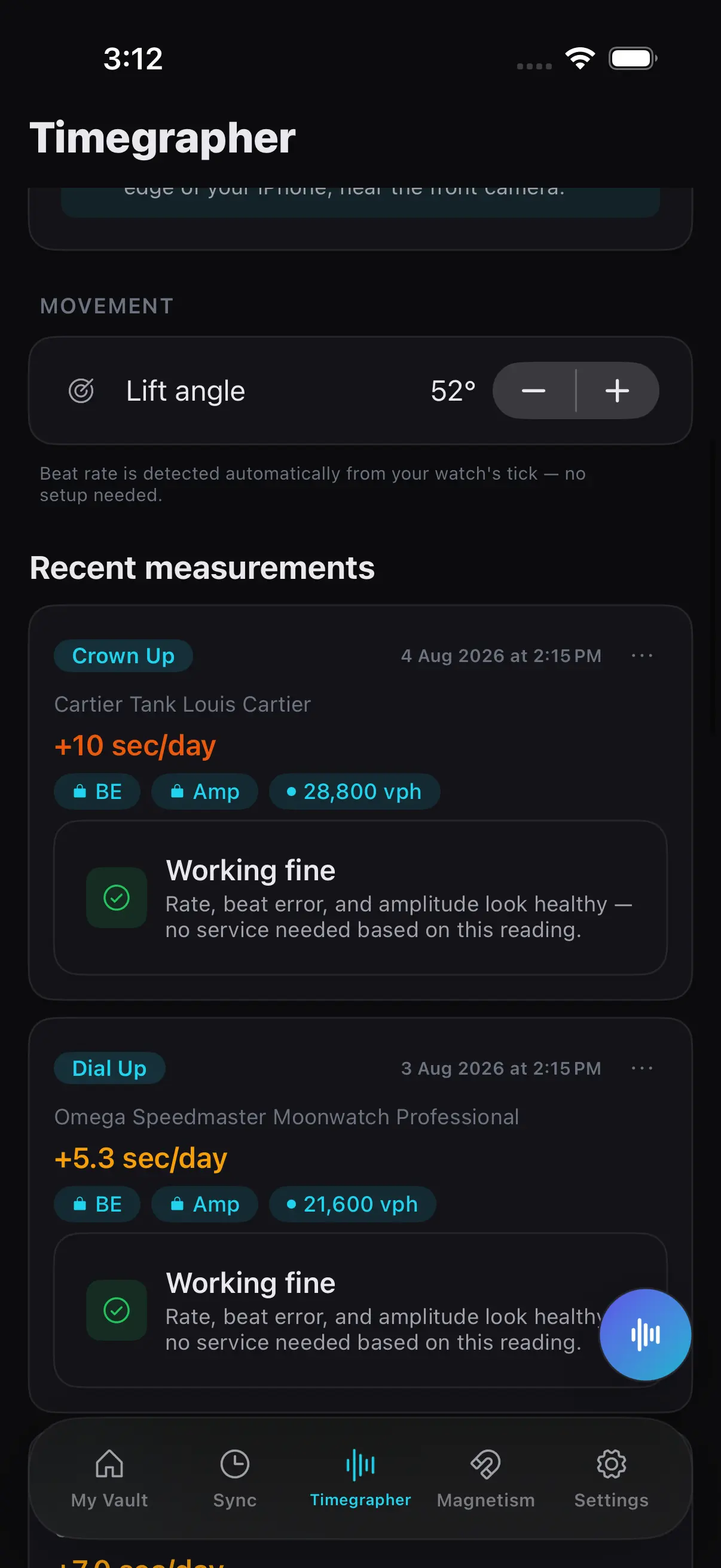
Most timegrapher apps stop at the reading. Zen Horology puts it next to everything else you know about the watch: reference and serial, papers, service history, wear and value. You pick the watch and position, choose the top or bottom microphone, rest the crown against that edge of the phone, and the app detects the beat rate and draws a live trace. Lift angle defaults to 52° with a stepper for other calibres. Each session is saved against the watch with a plain-language read of whether it looks healthy.
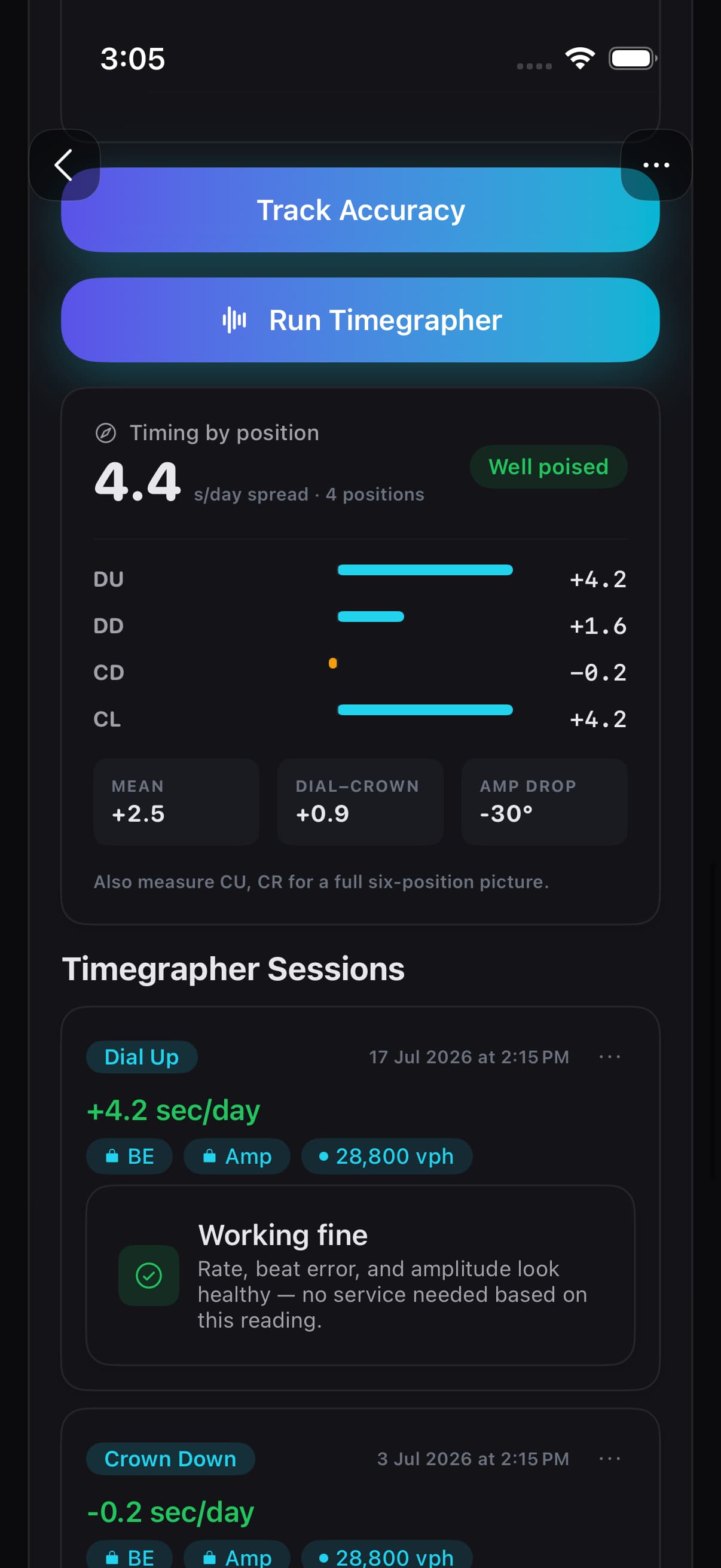
Positions are where a phone app earns its keep. Zen Horology times dial up, dial down, crown down and crown left and shows the spread across them, so you can see how well the movement is poised instead of trusting one flat reading.
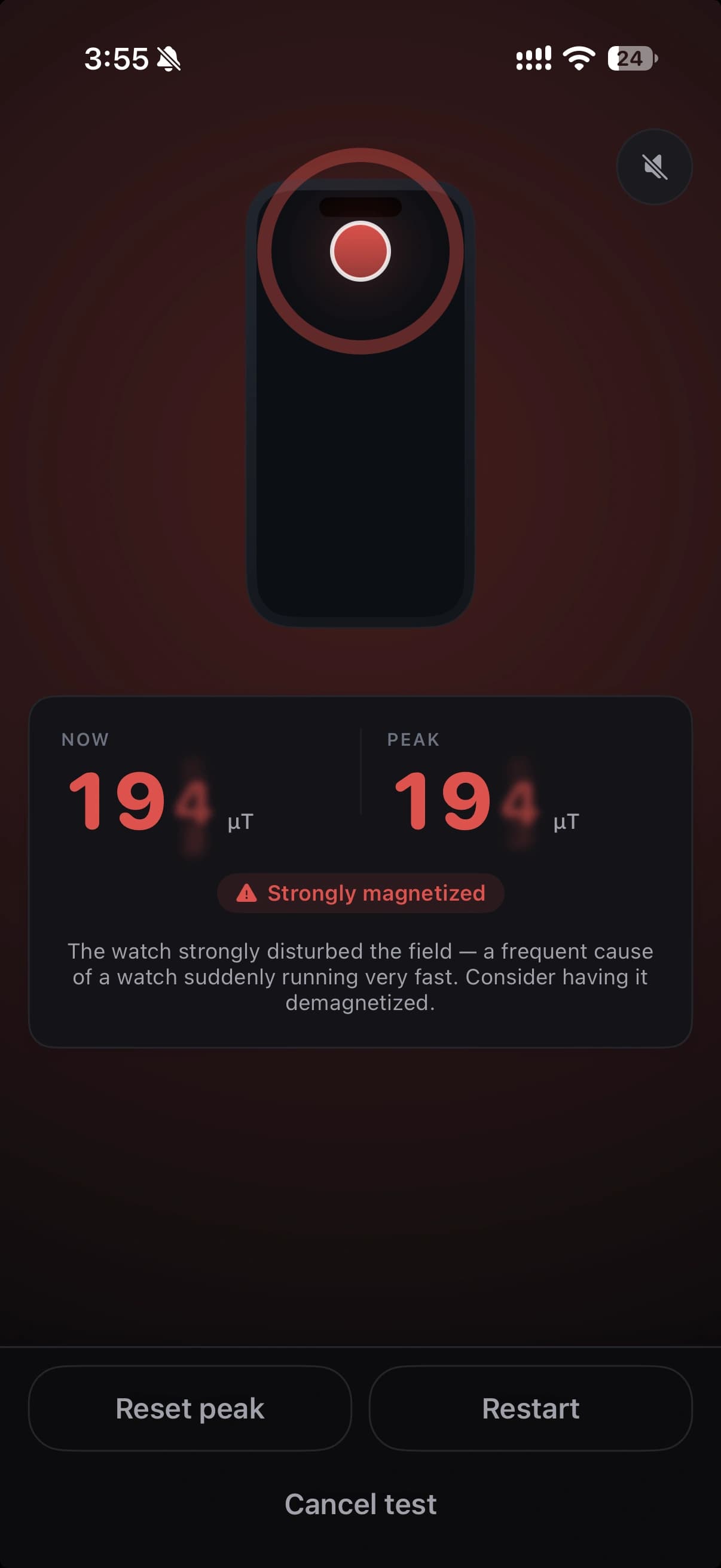
Two other tools sit one tab away. When a watch suddenly gains minutes a day, the Magnetism tab reads the field from the iPhone magnetometer in microtesla. It is a screening tool and it does not demagnetise anything; our guide is my watch magnetized? How to check with your iPhone walks through it. The Sync tab is a reference clock to a tenth of a second for setting the watch and logging checkpoints, which gives you the rate on the wrist over days.
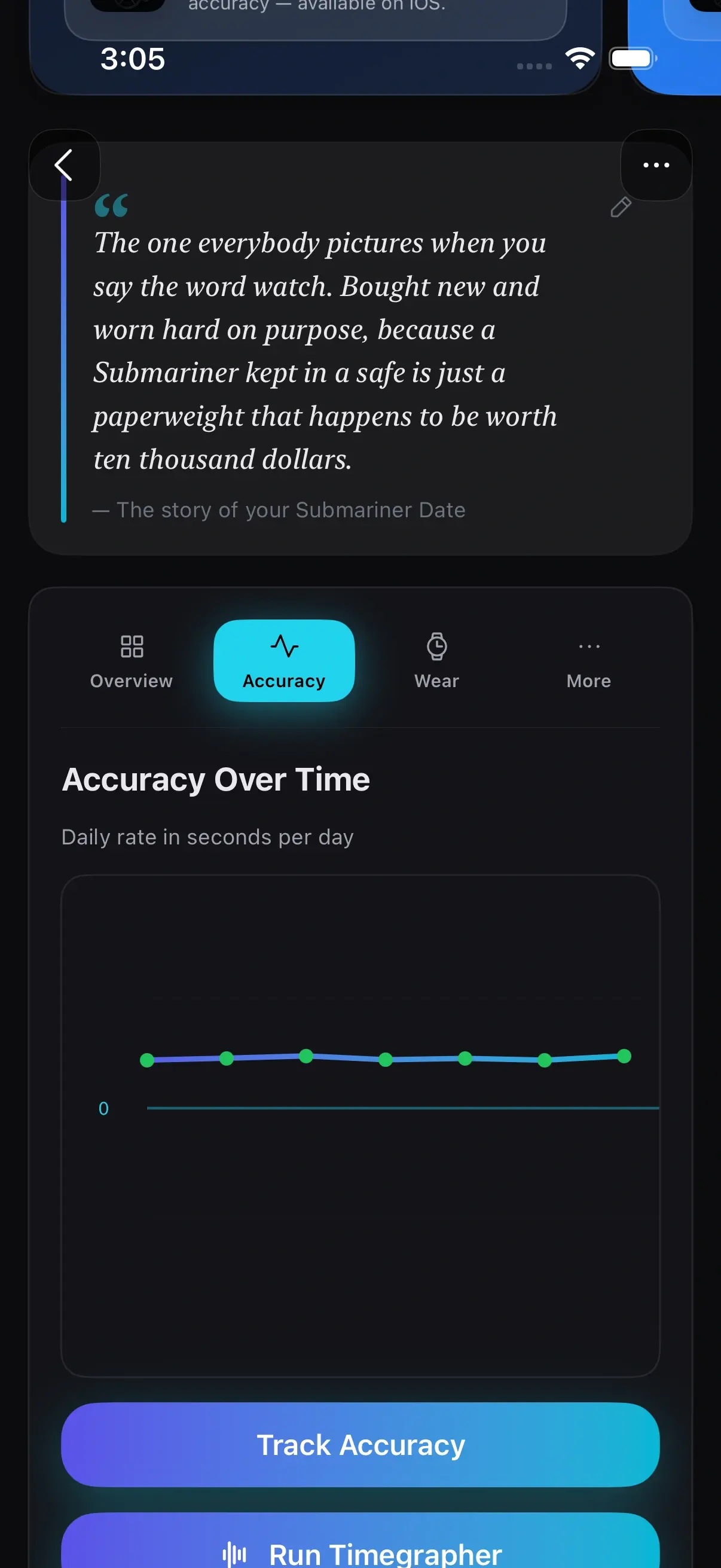
What you pay: the free tier covers two watches with beat rate, the live trace, accuracy checkpoints, wear tracking, magnetism screening and the reference clock. Premium is an annual subscription that adds beat error, approximate amplitude and unlimited watches; Apple shows the price before you buy. There is no account and no ads, the collection database stays on your device, and photos and documents use your own iCloud Drive. It runs on iPhone and iPad. If you only want a rate reading and nothing else, it is more app than you need.
Timegrapher (Watch Accuracy): the strongest one-time purchase
This app by Fotios Avgidis is the closest match to Zen Horology’s scope on a single payment. Its listing covers rate, amplitude and beat error, a lift angle per calibre, guided four or six position runs, a magnetometer check, a photo-based rate over a day of wear, PDF and CSV export and an atomic clock. The first watch is free and Timegrapher Pro is $9.99 once for unlimited watches (as of 16 November 2026). It is iPhone only and new, with 25 ratings.
Timegrapher X: long tests and raw data
Timegrapher X ($29.99, plus a $29.99 Pro upgrade, as of 16 November 2026) is built for people who want to watch a movement for hours. Its Instant tab behaves like a bench timegrapher with a live waveform; its Long Test tab logs up to 12 hours, or 120 hours with Pro, along with PDF reports and CSV export, per its developer’s site. The listing says it is optimised for a wired EarPods headset microphone pressed against the crown, so budget for one. iPhone only, iOS 18 or later.
ChronoLog: rate over weeks, not seconds
ChronoLog measures rate only, in seconds per day, with a confidence score on every reading and beat rates from 18,000 to 36,000 bph. Its focus is the long view: timing runs across days of wear, a photo-offset method against NTP time, tags for position and temperature, a collection log and CSV export. The listing promises no subscription and no account, with a one-time Premium unlock (listed at both $5.99 and $6.99 as of 16 November 2026). Pick it if you never care about beat error or amplitude.
tickIQ: the most rated, and the most social
With 820 ratings, tickIQ has the largest following here. It measures rate, beat error and amplitude in about 30 seconds and wraps that in wrist-shot rotation tracking, AI service predictions, shareable graphics and a collector community. Its listing names its in-app purchases as weekly, monthly and annual subscriptions from $4.99 a month to $59.99 a year, plus a $29.99 lifetime option (as of 16 November 2026), without saying which features are free. Its privacy label lists email address and user ID among the data collected.
Oscillo and Watch Tuner
Oscillo measures all three numbers and lists the widest beat-rate support we saw, from 12,000 to 72,000 bph, with a collection, AI watch identification and six-position cycles in Pro. It needs iOS 26 or later; Pro is $6.99 a month, $29.99 a year or a lifetime purchase listed at $49.99 and $59.99 (as of 16 November 2026).
Watch Tuner Timegrapher ($6.99 upfront) is a long-running, no-frills option: rate, beat error, amplitude, beats per hour and a frequency diagram, using the built-in or a headset microphone. Watch Tuner Lite is free and shows rate only. Ratings are mixed (3.8 from 80).
Names you will see that are not iPhone timegraphers
- Watch Accuracy Meter: an Android app on Google Play. We found no iPhone version in the US App Store.
- Watch-O-Scope: Windows software that works with a microphone test stand. It is a good hobbyist route if you own a PC and a stand, but it does not run on an iPhone.
- WatchCheck: the current iPhone app with this name scores used-watch listings on price, condition and papers. It does not time a watch.
- Toolwatch (Watch accuracy app): still listed, but its last update was 30 May 2017, so check it runs on your iOS version before relying on it.
How to get a clean reading on any app
- Wind the watch fully or wear it for a day first. Low power lowers amplitude and moves the rate.
- Find a quiet room and switch off fans and music. Several of these listings warn that background noise spoils readings.
- Put the phone and watch on a firm surface, crown or case touching the phone where the microphone is. Contact matters more than volume.
- Set the lift angle for your calibre from the maker’s technical documentation if you care about amplitude.
- Let each position settle for a few seconds, then take the reading. Measure at least dial up, dial down and one crown position.
- Save the result against the watch and repeat on another day. A change from your own baseline tells you more than one number against a table.
To judge the rate you get, compare it with how accurate an automatic watch should be, which lists chronometer standards and calibre specifications.
When to buy a hardware timegrapher instead
Buy a bench machine if you regulate or service movements yourself, if you need dependable amplitude to decide whether a watch needs a service, or if you time co-axial or other unusual escapements and need a mode for them. A clamp holds the watch in a fixed position and the contact pickup hears far more than a phone does through air. For checking how a watch runs, spotting magnetism and keeping an honest history of your collection, a phone app covers it.
Which one should you pick?
- You own several watches and want one place for readings, positions, magnetism, setting the time and the records: Zen Horology.
- You want all three metrics, positions and export, and you dislike subscriptions: Timegrapher (Watch Accuracy).
- You want to log a movement for hours and export the raw data: Timegrapher X.
- You only care about seconds per day over weeks of wear: ChronoLog.
- You want rotation tracking and a community to share results with: tickIQ.
- You are on Android: Watch Accuracy Meter, not anything on this list.
If the collection side is what you need most, our roundup of apps to catalog a watch collection on iPhone compares those tools on their own.