


To read timegrapher results, look at three numbers. Rate (s/d) is how many seconds a day the watch gains or loses. Beat error (ms) is how unevenly the balance swings to each side, and amplitude (degrees) is how far it swings, which is the best single sign of the movement’s health. A fully wound watch in good order typically shows a small rate, a beat error under about half a millisecond and an amplitude somewhere around 250 to 330 degrees dial up, per the reference values in Witschi’s watchmaker training course.
Those ranges only mean something once the machine is set up correctly and you have read more than one position. This guide covers each number, the two settings that change them (beat rate and lift angle), how to read the trace, and what a phone timegrapher can and cannot tell you. We build Zen Horology, an iPhone app with an acoustic timegrapher, so the screenshots are from it. Everything else applies to a Weishi, a Witschi or any app.
What a timegrapher actually listens to
A mechanical watch makes a short burst of clicks every time the escapement releases. A timegrapher picks up that sound with a microphone and times each burst against its own reference clock. Every number it shows is derived from those timestamps; it never sees the balance wheel.
That is why setup matters. The errors being measured are tiny, and the machine finds them by averaging thousands of beats, so anything that blurs the click (a soft surface, background noise, a weak mainspring) blurs the result.
Rate (s/d): the number most people care about
Rate is the gain or loss projected over 24 hours, in seconds per day. Plus means fast, minus means slow. Witschi computes it as the average of the tick rate and the tock rate, so a large beat error does not by itself push the rate off.
A timegrapher run lasts seconds, so the figure is an extrapolation. Certified standards are measured over days. COSC tests a movement for about 15 days in five positions at 8, 23 and 38 °C, and requires an average daily rate of -4 to +6 s/d plus six other criteria. Rolex specifies -2/+2 s/d for the cased watch. A 30-second reading in one position can hint at that territory; it cannot certify it.
For the real-world version (how many seconds the watch actually drifts across a week of wear), log checkpoints against a reference clock. We cover that workflow in how to track mechanical watch accuracy with your iPhone. The timegrapher tells you how the movement behaves right now; checkpoint logging tells you how it behaves on your wrist.
Beat error (ms): tick versus tock, and when it matters
The balance should swing the same distance either side of its rest point. When that rest point is slightly off centre, it swings further one way, so tick to tock takes a different time from tock to tick. Witschi calls this repère and reports it in milliseconds: zero means perfectly symmetrical.
Beat error and rate measure different things. A watch can have 0.0 ms beat error and run 20 s/d fast, or 1.5 ms and keep good time. Beat error tells you about the setup of the balance, which is why Witschi’s troubleshooting corrects it before regulating the rate.
Witschi’s training values for a movement in good order are 0.0 to 0.5 ms, and its worked example of a fault shows about 3 ms, where the advice is to correct the beat first and then regulate the rate. Between those two, the guidance thins out. Hobbyist forums commonly treat anything up to about 1 ms as acceptable on a vintage or unadjusted watch. That is forum consensus; we found no manufacturer figure for it.
Amplitude (°): the health signal, and why it is the hardest to measure
Amplitude is the angle the balance swings from rest to its turning point. It reflects how much energy reaches the balance through the gear train and escapement. Witschi notes that it falls gradually as the oils age, which is why watchmakers read it first: amplitude drops before the rate goes wrong.
It is also the one number a timegrapher has to infer. The beat noise contains several clicks. The machine measures the time between the first and third, during which the balance turns through a fixed angle called the lift angle. A wide swing crosses that angle quickly, a weak swing slowly. At 28,800 bph with a 52° lift angle, a 280° amplitude crosses it in about 7.4 ms and a 250° amplitude in about 8.3 ms. Under a millisecond separates a healthy watch from a tired one, which is why noise affects amplitude far more than rate.
Scroll sideways to compare every column.
Reference values from Witschi’s training course, p. 15, measured fully wound. Witschi adds that a fall of about 10 to 15 percent after 24 hours is acceptable. H = horizontal (dial up or down), V = vertical.
| Watch type | Rate (s/d) | Amplitude H | Amplitude V | Beat error |
|---|---|---|---|---|
| Gent’s watch | -5 to +15 | 250° to 330° | 250° to 270° | 0.0 to 0.5 ms |
| Lady’s watch | -5 to +25 | 250° to 330° | 250° to 270° | 0.0 to 0.5 ms |
| Chronometer | -2 to +6 | 250° to 330° | 250° to 270° | 0.0 to 0.5 ms |
| Chronograph | -5 to +15 | 250° to 330° | 250° to 270° | 0.0 to 0.5 ms |
Two caveats on that table. The same Witschi document gives the vertical range as 220° to 270° on the previous page, so treat vertical figures in the 220s as within normal reference values, especially on an older watch. And these are training reference values, not a service specification for any one calibre. Your movement’s maker may publish its own.
- Too high: Witschi links readings around 330° and above to the balance knocking (rebanking), heard as a doubled tick, and points to the mainspring or escapement. Check your lift angle setting before believing a very high number (see the next section).
- Too low: Witschi pairs an irregular rate with insufficient amplitude as a sign that the watch needs an overhaul. Hobbyist forums commonly treat dial-up amplitude below about 200° on a fully wound watch as a reason to book a service; that threshold is forum consensus.
- Big drop from flat to vertical: some fall is normal because the balance pivots rub on their sides when the watch is upright. Compare against your own earlier readings of the same watch.
Beat rate and lift angle: settings that change the answer
Before any reading is meaningful, the timegrapher has to know two things about the movement. Most machines and apps detect the beat rate automatically. The lift angle has to be entered.
Scroll sideways to compare every column.
Common beat rates. Frequency = A/h / 7,200 (Witschi); the 25,200 example is from Omega’s calibre 2403 technical guide. Beat interval and per-beat error are arithmetic.
| Beat rate (bph) | Frequency | Beats per second | Time per beat | Per-beat error at +10 s/d |
|---|---|---|---|---|
| 18,000 | 2.5 Hz | 5 | 200 ms | 0.023 ms |
| 21,600 | 3 Hz | 6 | 166.7 ms | 0.019 ms |
| 25,200 | 3.5 Hz | 7 | 142.9 ms | 0.017 ms |
| 28,800 | 4 Hz | 8 | 125 ms | 0.014 ms |
| 36,000 | 5 Hz | 10 | 100 ms | 0.012 ms |
If the beat rate is set wrong, the rate reading is nonsense: a 28,800 watch read as 21,600 shows an impossible gain. Auto-detect avoids that. Lift angle is subtler, because a wrong value still produces a plausible-looking number.
Witschi says the lift angle is about 51° for most standard movements, and many machines and apps default to 52°. It is not universal. ETA’s technical communication for the 2824-2 lists 50°. Omega’s technical guide for co-axial calibre 2403 lists 38° for the 3.5 Hz version and warns that older Witschi instruments do not indicate co-axial amplitude correctly at all, so it accepts those readings for rate adjustment only.
Because amplitude is calculated in proportion to the lift angle you enter, the error scales directly. Enter 52° for a movement whose true lift angle is 38°, and every amplitude reading comes out about 37 percent too high.
Scroll sideways to compare every column.
The same true amplitude of 270°, read with the lift angle left at 52°. Arithmetic from the amplitude formula; manufacturer lift angles from ETA and Omega documents cited above.
| Movement | Maker’s lift angle | Reading at 52° | What you might wrongly conclude |
|---|---|---|---|
| ETA 2824-2 | 50° | about 281° | Small error; still a fair read |
| Typical Swiss lever (Witschi) | about 51° | about 275° | Negligible |
| Omega 2403 co-axial, 3.5 Hz | 38° | about 369° | “Knocking, needs a new mainspring” |
So the first thing to check when a reading looks alarmingly high is the lift angle. Look it up in the maker’s technical documentation for your calibre. Where only forum posts give a value, treat the resulting amplitude as approximate.
How to read the timegrapher graph
Under the numbers, most timegraphers plot each beat as a dot on a scrolling trace. The shape tells you things the averages hide.
- Flat line: on rate. On most machines a line rising to the right means the watch is gaining and a falling line means it is losing; the steeper, the bigger the error.
- Two parallel lines: beat error. Ticks and tocks land at different offsets, and the gap between the lines grows with the beat error.
- A line that wanders in a regular wave: Witschi links large, regular rate variations to faults in the gear train, such as a wheel that runs untrue.
- Scattered dots with no clear line: either noise (a bad signal) or, per Witschi, an irregular rate that usually comes with insufficient amplitude. Fix the setup and re-run before concluding anything.
Scroll sideways to compare every column.
Reading the combination. Patterns and actions from Witschi’s troubleshooting pages; these suggest where a watchmaker would look, not a diagnosis.
| What you see | What it usually points to |
|---|---|
| Good amplitude, low beat error, rate off by a steady amount | Regulation only |
| Beat error around 3 ms | Put the watch in beat first, then regulate |
| Rate varies a lot between vertical positions | Balance poise or centring |
| Irregular rate, low amplitude | Lubrication and wear: an overhaul |
| Amplitude around 330° or more with a doubled tick | Knocking, if the lift angle is right |
| Rate suddenly tens of s/d fast after years of good timekeeping | Check for magnetism before anything else |
Why one reading is not a verdict: positions and repeat runs
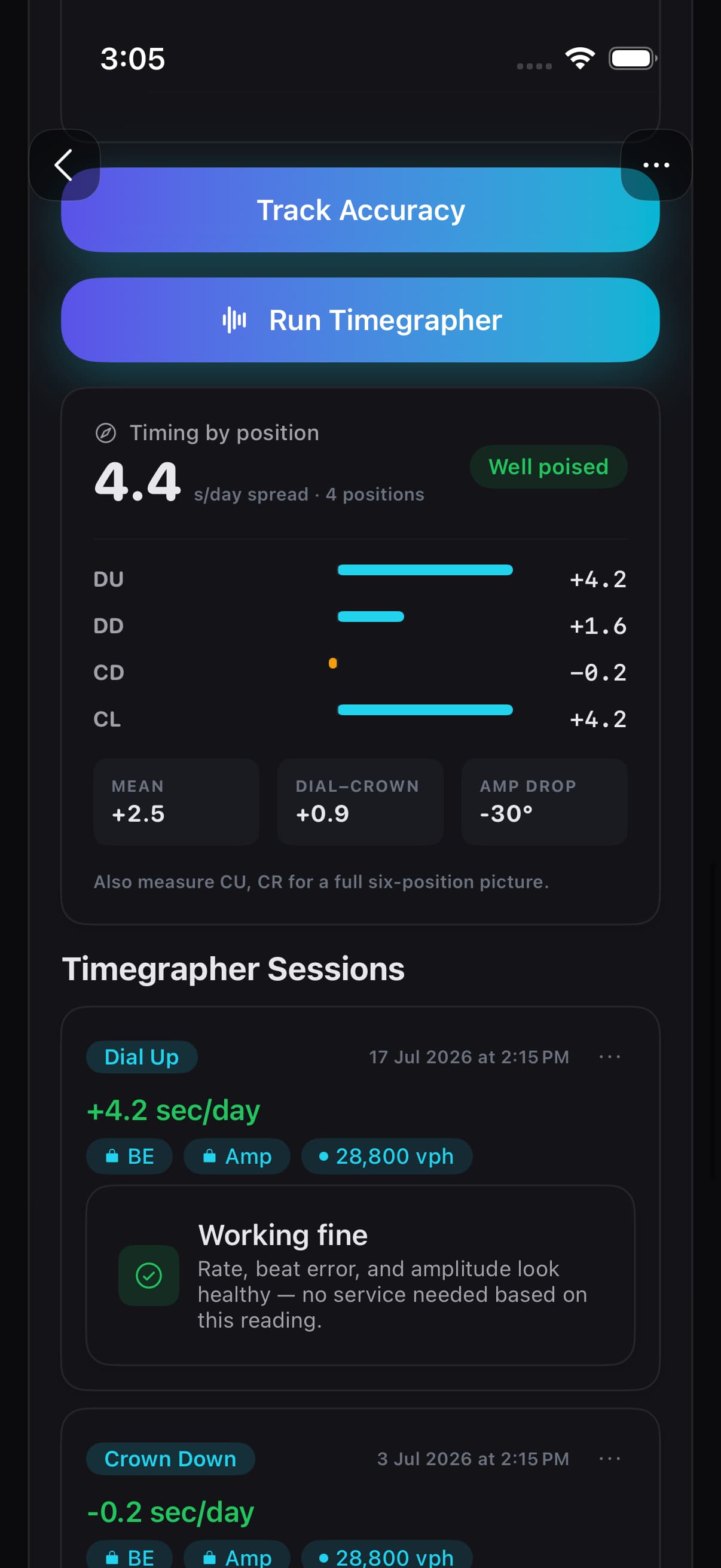
Gravity acts on the balance differently in each orientation, so a watch has a different rate in every position. COSC tests five: dial up, dial down and three vertical positions. Positions are named by which way the dial or crown faces: dial up (DU), dial down (DD), crown up (CU), crown down (CD), crown left (CL) and crown right (CR).
The useful numbers are the spread between positions and the difference between flat and vertical averages, more than any single rate. A well poised movement keeps them small even if the average is a little fast.
A routine that gives you numbers worth comparing:
- Wind the watch fully, or wear it for a day, so you know the state of wind. Amplitude at low power is the mainspring talking, not the movement.
- Set the lift angle for your calibre and let the beat rate auto-detect (or set it from the calibre specification).
- Rest the watch on something firm in a quiet room, and give each position a few seconds to settle before trusting the figures.
- Measure at least dial up, dial down and crown down. Add crown left, crown up and crown right for the full picture.
- Write down rate, beat error and amplitude for each position, with the date and state of wind. Repeat after 24 hours to see how much amplitude falls.
- Compare against your own earlier readings. A change from your baseline is more informative than any one reading against a table.
What a phone timegrapher can and cannot tell you
A bench timegrapher clamps the watch against a contact pickup; a phone listens through the air with the watch resting against it. Rate and beat rate come from timing whole beats and average out well, so in a quiet room they are the most dependable phone readings. Beat error needs tick and tock told apart cleanly, so noise hits it first.
Amplitude is the hardest, for the reason above: it depends on resolving clicks a few milliseconds apart within each beat, and then on a lift angle you supplied. Treat a phone amplitude as an estimate to compare with your own earlier readings of the same watch. Do not read it against a 10-degree threshold. Co-axial and other special escapements will read oddly even on bench machines unless the instrument has a mode for them.
Reading it on an iPhone with Zen Horology
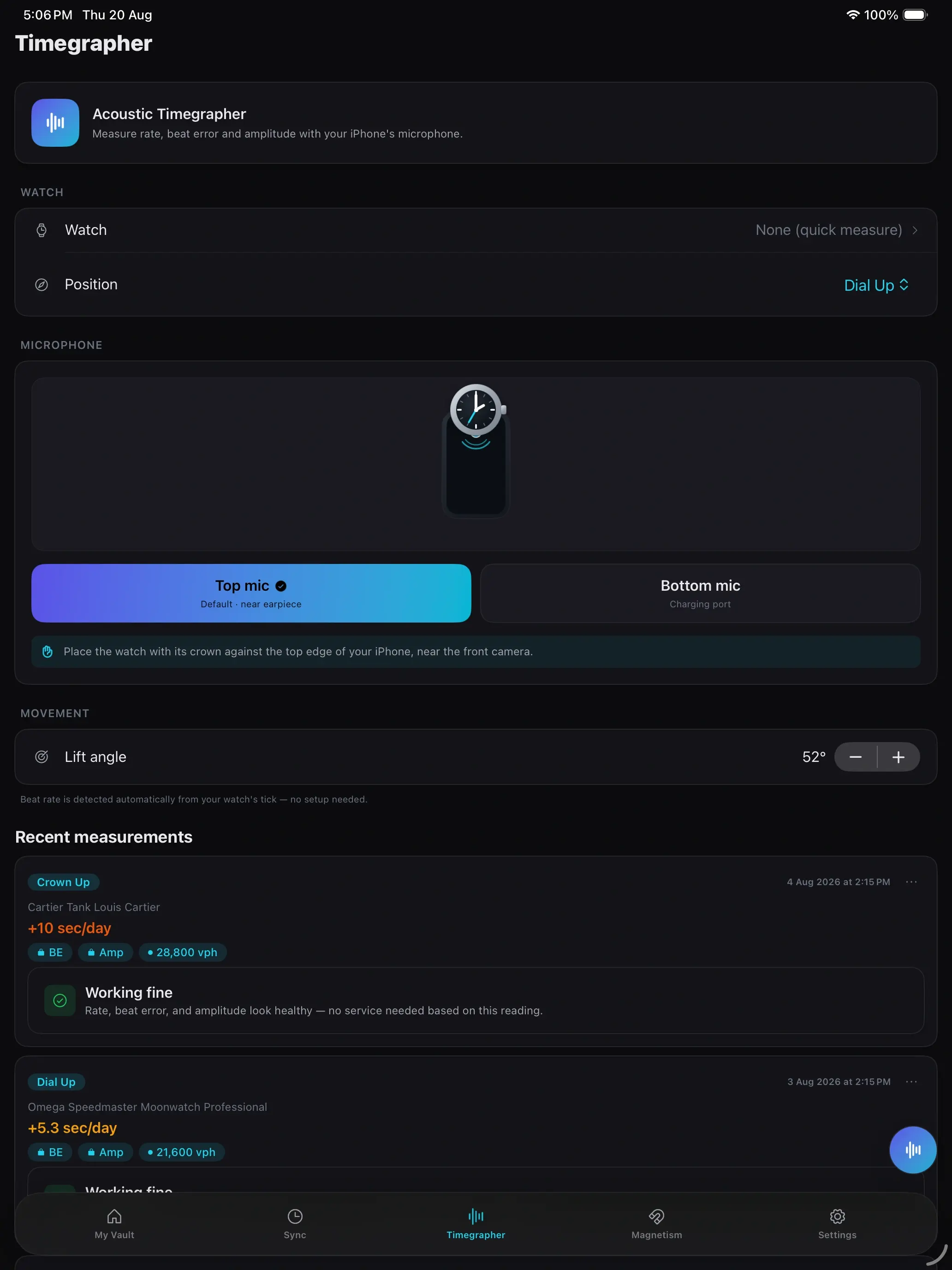
In Zen Horology you pick the watch and position, choose the top microphone (near the earpiece) or the bottom one (by the charging port), and rest the watch with its crown against that edge. The app detects the beat rate from the tick and shows a live trace, and the lift angle defaults to 52° with a stepper for co-axial and other calibres.
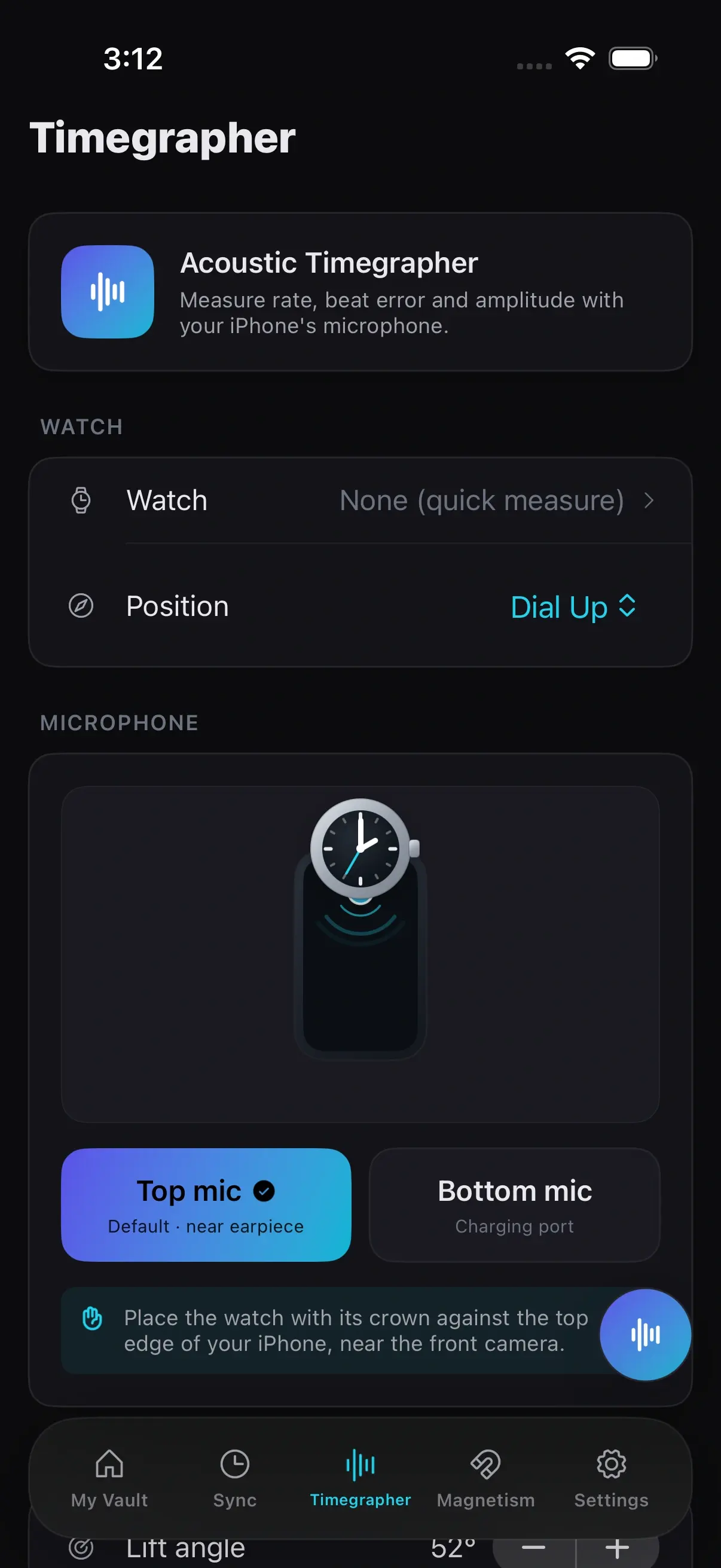
Each saved session records the position, the rate in seconds per day, the beat rate, and a plain-language summary of whether the reading looks healthy. The free tier covers two watches, beat rate and the live trace. Premium is an annual subscription that adds beat error, approximate amplitude and unlimited watches; Apple shows the price before you buy. In the screenshots, the BE and Amp chips are the locked Premium metrics.
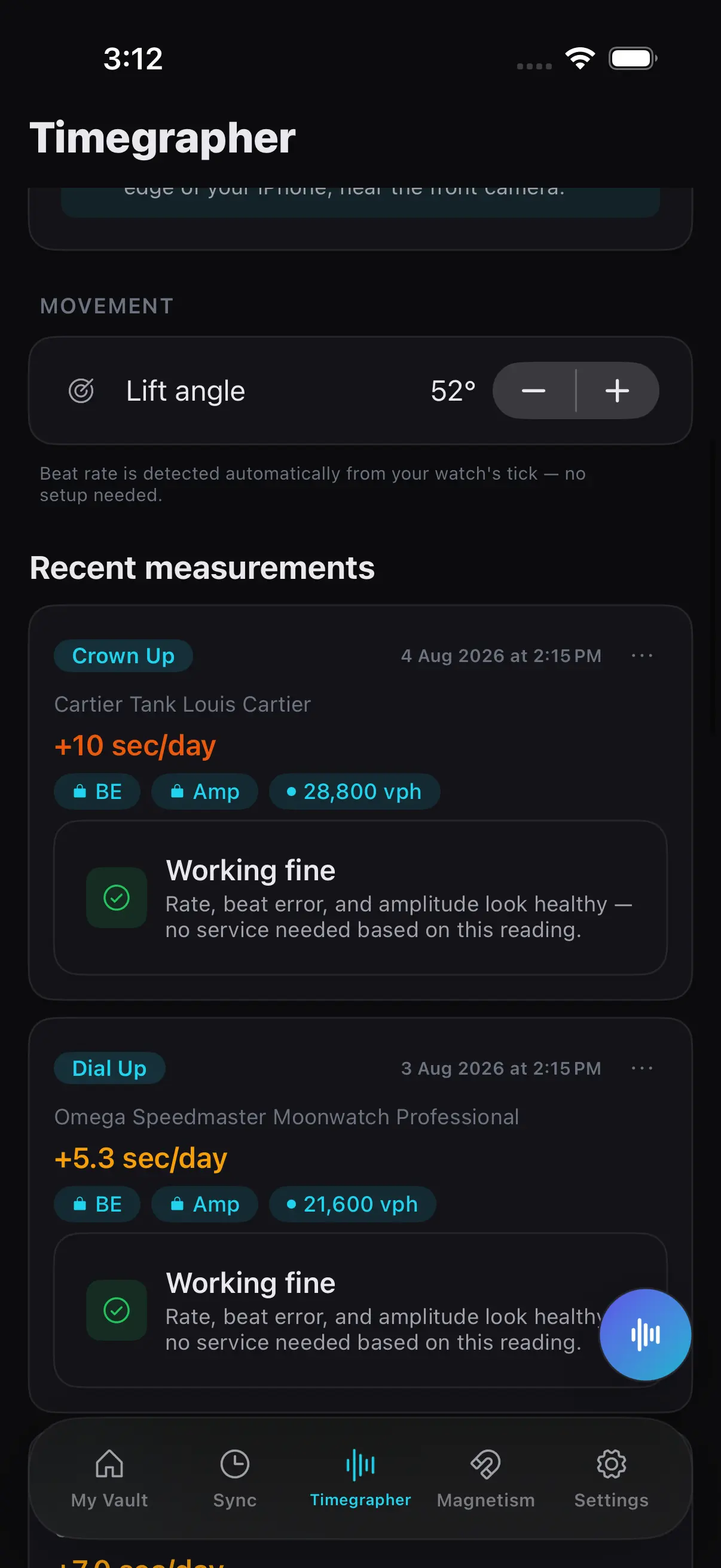
Sessions live with the watch’s record, next to its service history and papers, so the reading you took before a service sits beside the one you took after. If you are still setting that record up, see the best way to catalog a watch collection on iPhone. Zen Horology is free to try on the App Store. If you already own a bench timegrapher and only need numbers, the bench machine will give you steadier beat error and amplitude than any phone.