

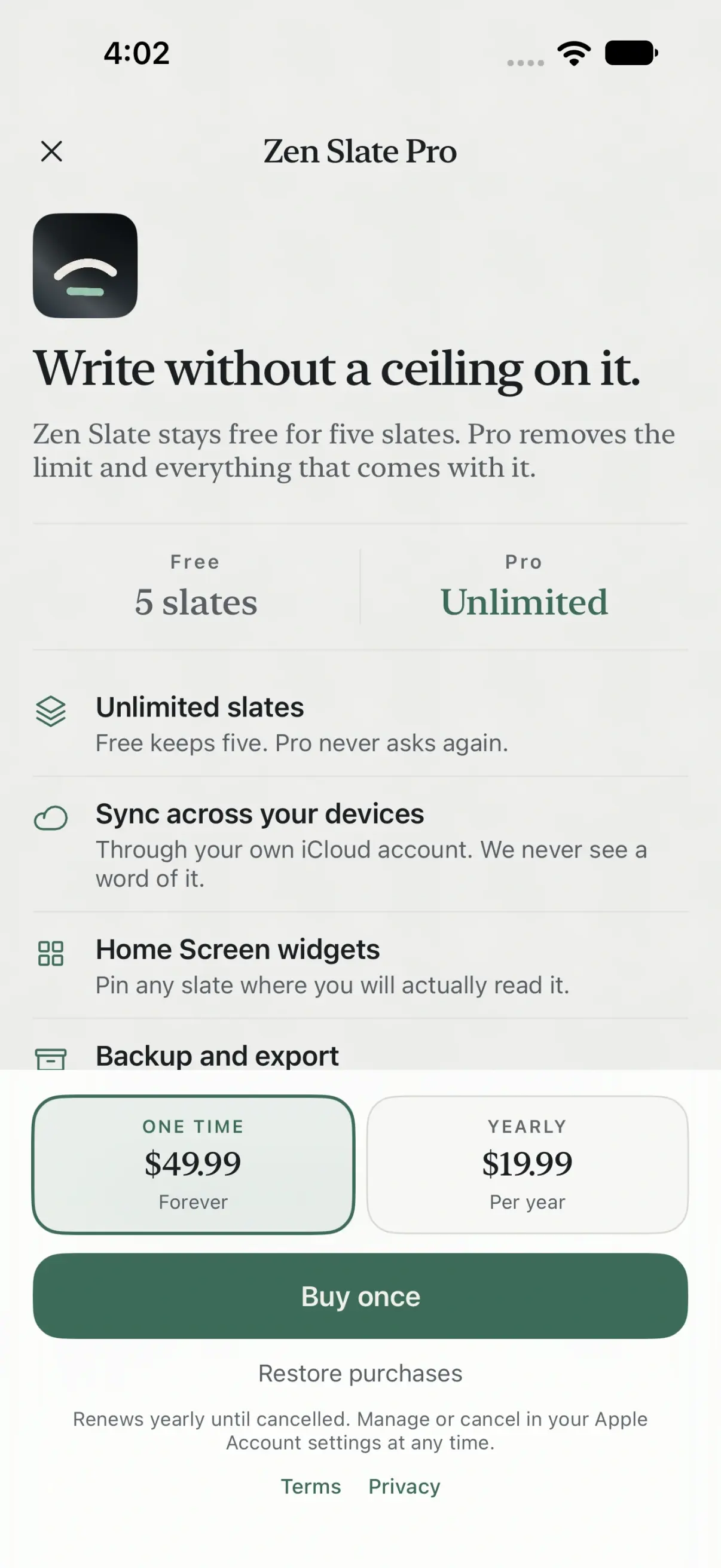
The best notes app without a subscription on iPhone and iPad is Zen Slate: you buy Pro once for $49.99 and keep it, and it adds what free apps leave out, including version history, a Face ID lock on any note, real to-dos with reminders and repeats, and sync through your own iCloud. If you want to pay nothing at all, Apple Notes is the free default, Simplenote and Standard Notes sync for free, and Obsidian is free with a paid sync you can skip.
Below are eight apps sorted by how you pay, with what each free tier actually allows and what sync costs, checked against App Store listings and the developers’ pricing pages on 14 November 2026.
Scroll sideways to compare every column.
Quick picks. All eight run on iPhone and iPad.
| If you want | Pick | What you pay |
|---|---|---|
| Notes, to-dos and version history, paid once | Zen Slate | $49.99 once, or $19.99 a year |
| Free, already installed, syncs | Apple Notes | Nothing (iCloud storage is shared) |
| Free plain text on every platform | Simplenote | Nothing |
| Free encrypted notes with sync | Standard Notes | Nothing for the free plan |
| Markdown files you own | Obsidian | Nothing, if you sync with iCloud |
| Typed notes everywhere, paid once | UpNote | $39.99 lifetime |
| Handwriting and PDFs, paid once | Goodnotes Special Edition | $35.99 once |
| Handwriting with audio, paid once | Notability Classic | $39.99 on the web, $49.99 in the App Store |
How we chose these apps
We started from the notes apps people search for alongside "no subscription" and "one time purchase", kept the ones updated recently and widely rated on the US App Store, and read each listing’s in-app purchase list and each developer’s pricing page. An app made the list only if you can use it indefinitely without a recurring charge. We do not give scores; each pick names the kind of note-taker it suits.
Most "no subscription" lists we read named apps without a single price, and several included apps whose sync is subscription only. Price model is the whole point here, so every claim below is tied to a source. Prices are US prices on 14 November 2026; the one Apple shows at checkout is the one that counts.
Free, free with paid extras, or buy once
"No subscription" covers three different deals, and the difference shows up the day you add a second device:
- Free, sync included: Apple Notes, Simplenote and Standard Notes’ free plan. Nothing to buy, ever, for the core app.
- Free app, paid service on the side: Obsidian. The app is free and complete; its own sync is a subscription, but iCloud sync costs nothing.
- One-time purchase: UpNote, Goodnotes, Notability and Zen Slate. A free tier with a cap, then one payment that does not renew. Each also sells a subscription, so pick the right item at checkout.
Scroll sideways to compare every column.
Price models and limits as stated by each developer, checked 14 November 2026.
| App | Free tier | Sync | One-time option | Also sold as subscription | Other platforms |
|---|---|---|---|---|---|
| Zen Slate | 5 slates | Pro, your iCloud | $49.99 | Yes, $19.99 a year | Mac |
| Apple Notes | Everything | iCloud, free (5 GB shared) | Not needed | No | Mac, iCloud.com |
| Simplenote | Everything | Free | Not needed | No | Android, Mac, Windows, Linux, web |
| Standard Notes | Core notes | Free, encrypted | None listed | Yes, $90 or $120 a year | Android, desktop, web |
| Obsidian | Everything | iCloud free; Sync paid | Catalyst $25 (optional) | Sync from $4 a month | Android, Mac, Windows, Linux |
| UpNote | 50 notes | With Premium | $39.99 lifetime | Yes, $1.99 a month | Android, Mac, Windows, Linux |
| Goodnotes | 3 files | Apple devices only | Special Edition $35.99 | Yes, from $11.99 a year | Special Edition: Apple only |
| Notability | 5 notes | Included in Classic | Classic $39.99 to $49.99 | Yes, Plus from $15.99 a year | Android, web |
Best overall without a subscription: Zen Slate
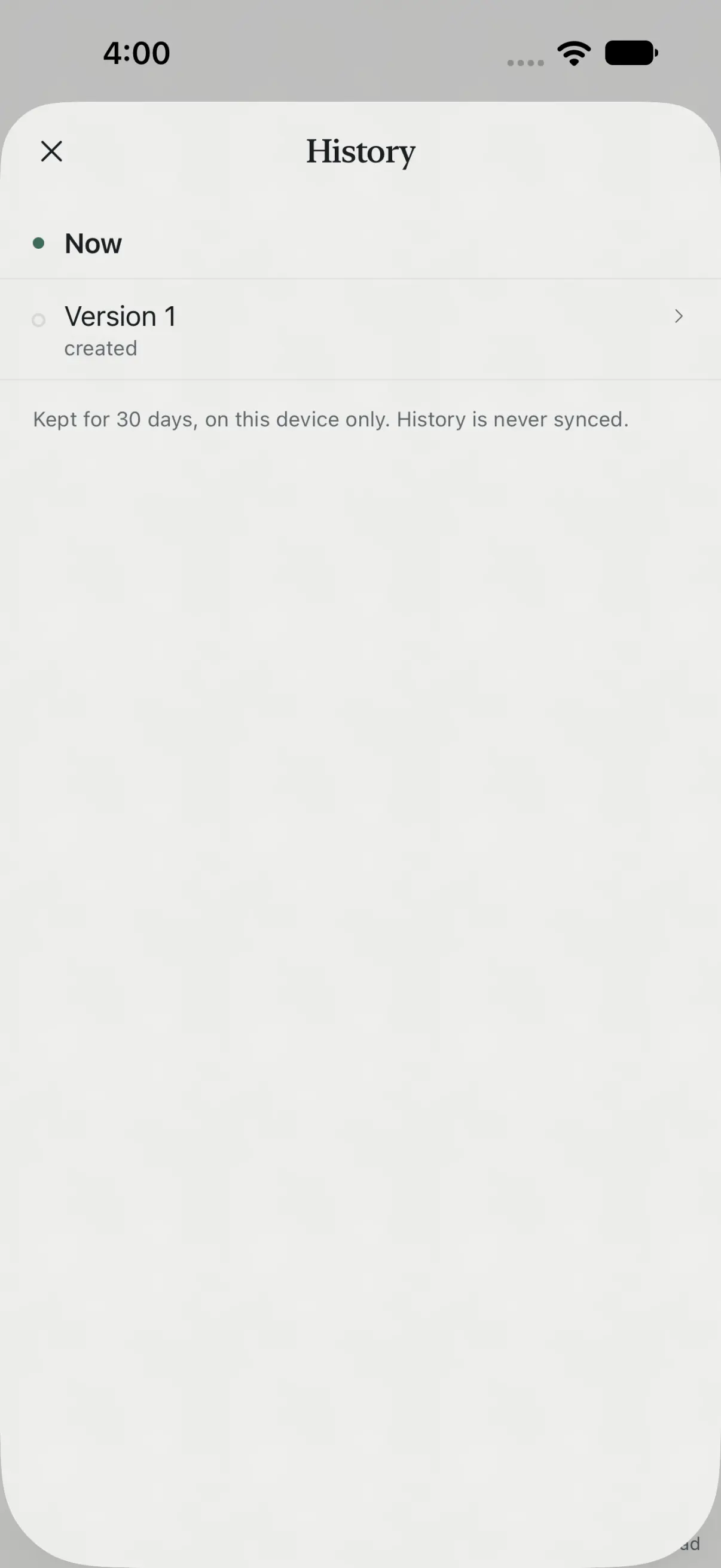
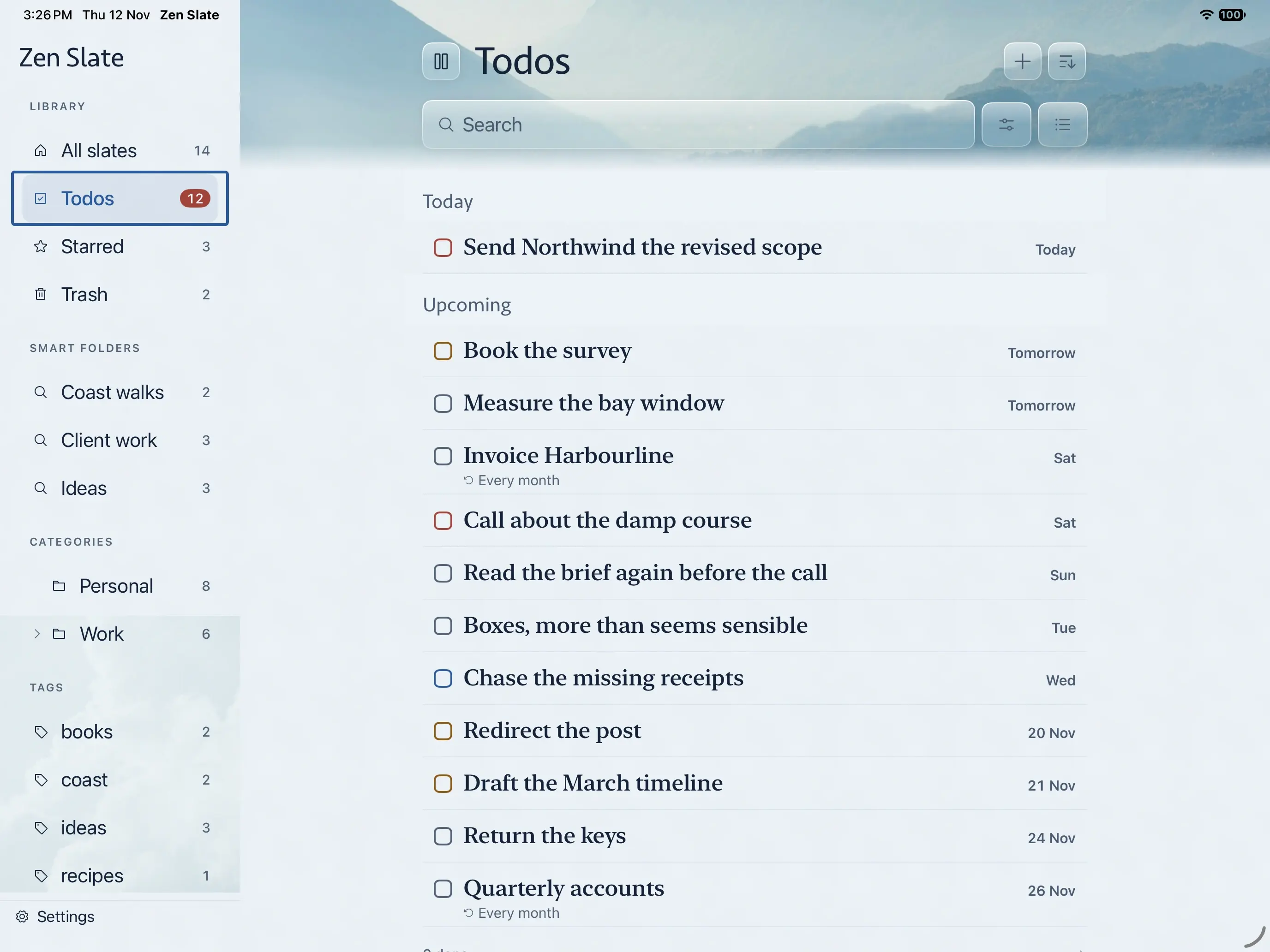
Zen Slate is a rich-text notes app with real to-dos (dates, reminders, priorities and repeats), voice memos with on-device transcription on supported devices, Apple Pencil sketches on iPad, a Face ID lock per slate and version history that keeps earlier versions for 30 days on the device. It runs on iPhone, iPad and Mac. There is no Zen Slate account: notes live on your device, and Pro sync runs through your personal iCloud account.
- Best for: iPhone, iPad and Mac users who want notes and to-dos in one private app, and would rather pay once.
- Standout: version history and per-slate Face ID locking, with sync through your iCloud instead of a vendor server.
- Limits: no Windows, Android or web app. The free tier holds five slates, and sync, widgets, backup and export need Pro. It is a typed-first app with sketches, not a handwriting notebook like Goodnotes or Notability.
- Price as of 14 November 2026: free for five slates; Pro $49.99 once (it does not renew) or $19.99 a year.
How the iCloud sync works, and what we can and cannot see, is covered in private iCloud sync for notes with Zen Slate Pro.
Best free app: Apple Notes
Apple Notes is free on iPhone, iPad and Mac, has no in-app purchases and syncs through iCloud. It covers checklists, tables, scanning, Apple Pencil drawing, locked notes, folders, tags and smart folders. For most people it is the right answer and nothing below needs to replace it.
- Best for: anyone who stays on Apple devices and wants zero setup.
- Standout: it is already installed and works across iPhone, iPad, Mac and iCloud.com.
- Limits: notes count against your iCloud storage, and the free allowance is 5 GB for everything, including photos and device backups. There is no version history, so an overwritten paragraph is gone. It does not run on Android or Windows apps.
- Price as of 14 November 2026: free. Paid iCloud+ storage is optional.
Apple’s 5 GB figure is on its iCloud storage support page. If you are weighing Notes against a dedicated app, our Zen Slate vs Apple Notes comparison goes through privacy, version history and to-dos point by point.
Best free plain-text app across platforms: Simplenote
Simplenote, from Automattic, is a plain-text notes app with tags and search. Its own site says apps, backups, syncing and sharing are all completely free, and it runs on iPhone, iPad, Android, Mac, Windows, Linux and the web.
- Best for: quick text notes shared between an iPhone and a Windows or Android device.
- Standout: free sync on every major platform, with no paid tier at all.
- Limits: text only, with no images, attachments or handwriting. The iOS app was last updated on 4 November 2024, so expect few new features.
- Price as of 14 November 2026: free.
Best free encrypted notes: Standard Notes
Standard Notes encrypts notes end to end before they sync. Its plans page lists unlimited device sync and end-to-end encryption on the free plan, so the free tier is usable on its own and not a trial.
- Best for: people who want encrypted sync between iPhone and a computer without paying.
- Standout: free encrypted sync across iOS, Android, desktop and web.
- Limits: an account is required for sync. The paid plans are yearly subscriptions only, and no lifetime plan is listed.
- Price as of 14 November 2026: free plan; Productivity $90 a year and Professional $120 a year (the App Store lists the Professional Plan at $119.99).
Best for Markdown files you own: Obsidian
Obsidian stores notes as plain Markdown files in a folder called a vault, with links between notes, a graph view and a large plugin library. Its pricing page calls the app "free without limits" with no sign-up. Obsidian Sync is the paid part, and you can skip it: the Obsidian help page on syncing explains storing a vault in iCloud Drive on iPhone and iPad.
- Best for: writers and researchers who want future-proof files and links between ideas.
- Standout: your notes are ordinary .md files any editor can open, so there is nothing to export.
- Limits: iCloud only syncs between Apple devices; reaching Windows or Android without Obsidian Sync takes workarounds the help page calls unsupported on iOS. The mobile app is more setup than a typical notes app.
- Price as of 14 November 2026: free. Obsidian Sync is $4 a month billed yearly or $5 monthly; Catalyst is an optional $25 one-time supporter license.
Best one-time purchase for typed notes on every platform: UpNote
UpNote is a rich-text notes app with notebooks, tags and a web clipper. Its website lists Premium at $1.99 a month or $39.99 for lifetime, bought in the iOS, Android or Mac app, and it runs on Mac, Windows, Linux, iOS and Android.
- Best for: someone moving off a subscription notes app who still needs Windows or Android.
- Standout: a lifetime price that covers every platform it runs on.
- Limits: the free version allows up to 50 notes. The App Store in-app list shows several lifetime prices ($24.99, $29.99, $34.99 and $39.99), so check which one you are offered.
- Price as of 14 November 2026: free up to 50 notes; Premium $1.99 a month or $39.99 lifetime.
Best one-time purchase for handwriting and PDFs: Goodnotes
Goodnotes is the handwriting and PDF annotation app most iPad students know. Its pricing page describes Special Edition as a one-time purchase for "unlimited Apple note-taking without a subscription", Apple devices only and not eligible for Goodnotes Cloud. The App Store lists it at $35.99.
- Best for: handwritten lecture notes, planners and marked-up PDFs on iPad.
- Standout: unlimited notebooks for one payment, without the subscription tiers’ renewals.
- Limits: no cross-platform library, and only limited AI (the AI Pass add-on is $9.99 a month). The free tier stops at 3 files and watermarks exports.
- Price as of 14 November 2026: Special Edition $35.99 once; Essential $11.99 a year; Pro $35.99 a year.
Best one-time purchase for handwriting with audio: Notability
Notability mixes handwriting, typing and audio recording that replays in step with your notes. After moving to subscriptions in 2021, Ginger Labs brought back a one-time option called Classic in 2026. The Notability Classic help article lists unlimited notes, handwriting recognition, math conversion, collaboration, sync across iOS, Android and web, and 7 days of version history.
- Best for: students and meeting-heavy note-takers who record audio alongside handwriting.
- Standout: Classic includes sync, which most one-time tiers leave out.
- Limits: AI features are Plus and Pro only, and the help article says "features built for the subscription plans aren’t included". Classic is for individuals, not business plans. Starter, the free tier, allows 5 notes.
- Price as of 14 November 2026: Classic $39.99 at notability.com/pricing (choose the One-time toggle) or $49.99 in the App Store; Plus $15.99 a year.
Why Bear is not on this list
Bear is one of the best-designed notes apps on Apple devices, and its free version is genuinely usable on one device. But Bear’s own FAQ lists iCloud sync as a Bear Pro feature, sold at $2.99 a month or $29.99 a year, with no lifetime option. If you want the same notes on iPhone and iPad, Bear is a subscription. Our Zen Slate vs Bear comparison covers that trade-off in detail. Both now have a Mac app.
The same goes for Notesnook, a private notes app often recommended in these lists: its pricing page offers a free plan with limits (50 notebooks, 50 tags, 50 MB of uploads a month) and paid plans monthly, yearly or prepaid for five years, but no lifetime purchase.
How to choose a notes app without a subscription
- Count your devices. Apple only: Apple Notes, Obsidian with iCloud, Goodnotes Special Edition and Zen Slate all work. Windows or Android too: Simplenote, Standard Notes, UpNote or Notability Classic.
- Typed or handwritten? For handwriting and PDFs on iPad, choose between Goodnotes and Notability. For typed notes, every other app here fits.
- Check where sync lives in the price. A one-time purchase is only "no subscription" if it includes the sync you need. Notability Classic and UpNote lifetime include it; Goodnotes Special Edition syncs between Apple devices only; Obsidian is free if iCloud is enough.
- Use the free tier for a week first. The caps are small (3 files, 5 notes, 5 slates, 50 notes), which is enough to test the editor and search before paying.
- Choose the one-time item at checkout. Every paid app here also sells a subscription, and the App Store often shows both side by side.
- Export a note before you commit. Plain text, Markdown or PDF export means a future switch costs you an afternoon, not your archive.
The best iPad notes app without a subscription
On iPad the choice turns on the pencil. For handwritten notebooks and PDF markup, Goodnotes Special Edition ($35.99) is the cheaper one-time option and Notability Classic adds audio and cross-platform sync for a little more. For typed notes on a larger screen, Zen Slate gives you a sidebar of smart folders, categories and tags, real to-dos and sketches with Apple Pencil, bought once; Apple Notes is the free option.
