


To share a baby log with your partner on iPhone, both of you need to write into the same record from your own phones, each signed in with your own Apple Account. In Zen Otto, you invite your partner to a baby’s log through iCloud sharing. That is a separate choice from iCloud sync, which only keeps your own devices in step on one Apple Account.
Zen Otto is built for exactly this: two parents, two iPhones, one log, and no extra account to create. It is a paid app: after setup you choose a monthly or yearly subscription or a one-time purchase, and eligible subscriptions start with a three-day free trial. It records care information only. Questions about feeding, sleep or growth belong with your pediatrician.
Scroll sideways to compare every column.
The two iCloud features in Zen Otto, side by side. Most "my partner can’t see it" problems come from mixing them up.
| iCloud sync (your devices) | Caregiver sharing (your partner) | |
|---|---|---|
| Who it is for | You, on more than one device | A second person: partner, grandparent, nanny |
| Apple Account | Your own, the same on each device | Each person uses their own |
| Where the data goes | Your private iCloud database | The shared baby’s log, made available to the people you invite |
| Default | On when iCloud is available | Off until you invite someone |
| How to stop it | Settings, then iCloud; takes effect on next launch | The baby’s sharing controls |
| Turning the other one off | Does not end an existing share | Does not delete your own iCloud copy |
What "shared" has to mean at 3am
In the first weeks, a log gives you something concrete to bring to checkups. The AAP’s HealthyChildren guide names wet and dirty diapers among the clues that a breastfed baby is getting enough milk. Ask your pediatrician what they want you to record, and for how long.
Once two people are doing the care, a log that lives on one phone stops working. A shared baby tracker has to answer five questions without anyone texting the other:
- When was the last feed, and which side or how much?
- Did my partner already log that diaper, or am I about to log it twice?
- What happened on the last shift, in the thirty seconds before I take over?
- Can a grandparent or nanny add entries without my password?
- What exactly can the other person see, and how do I stop it?
Sync your devices vs invite a caregiver
Zen Otto stores care records on your iPhone first. When iCloud is available, sync is on by default and copies your records to your private iCloud database through Apple’s CloudKit service. This uses one Apple Account: Apple’s own CloudKit sharing sample notes that private data only syncs across devices signed in with the same Apple ID.
Your partner has their own Apple Account, so sync alone will never put your log on their phone. That is what caregiver sharing is for. Apple’s documentation for CloudKit shares says each participant must have an active iCloud account. Sharing your Apple Account password with your partner is the wrong fix: it would give them your email, photos and purchases along with the baby log.
Set up iCloud caregiver sharing in Zen Otto
- Check that both iPhones are signed in to iCloud, each with its own Apple Account. Your partner installs Zen Otto on their own iPhone (it needs iOS 17 or later).
- On your phone, open the baby whose log you want to share. Zen Otto keeps a separate log for each baby, and sharing is chosen per baby.
- Use that baby’s sharing controls to invite your partner through iCloud sharing.
- Your partner opens the invitation on their iPhone and accepts it with their own Apple Account.
- Test it before the night shift: log a diaper on one phone and confirm it appears on the other. Then edit the time on the other phone and check it changes back on yours.
The test in step 5 matters more than any setting. Do it while you are both awake and in the same room, so a problem gets fixed in daylight. Photos you attach to the log are stored with it and can be included in caregiver sharing, so decide before inviting whether that is what you want.
Who logs what: avoiding double entries
Double entries happen when both parents are awake for the same event and both reach for their phones. The fix is a short agreement between you, made before the first night shift:
- The person with hands on the baby logs it. The other person does not touch the app for that event.
- Whoever starts a timer ends it. If you hand the baby over mid-feed, say out loud who is ending the timer.
- Log late entries at the time they happened. Zen Otto lets you set the real time, so a feed logged an hour later still sits in the right place on the timeline.
- If a duplicate does appear, delete one. Every deletion in Zen Otto offers an undo, and every entry can be edited afterwards.
Who fed last, and which side
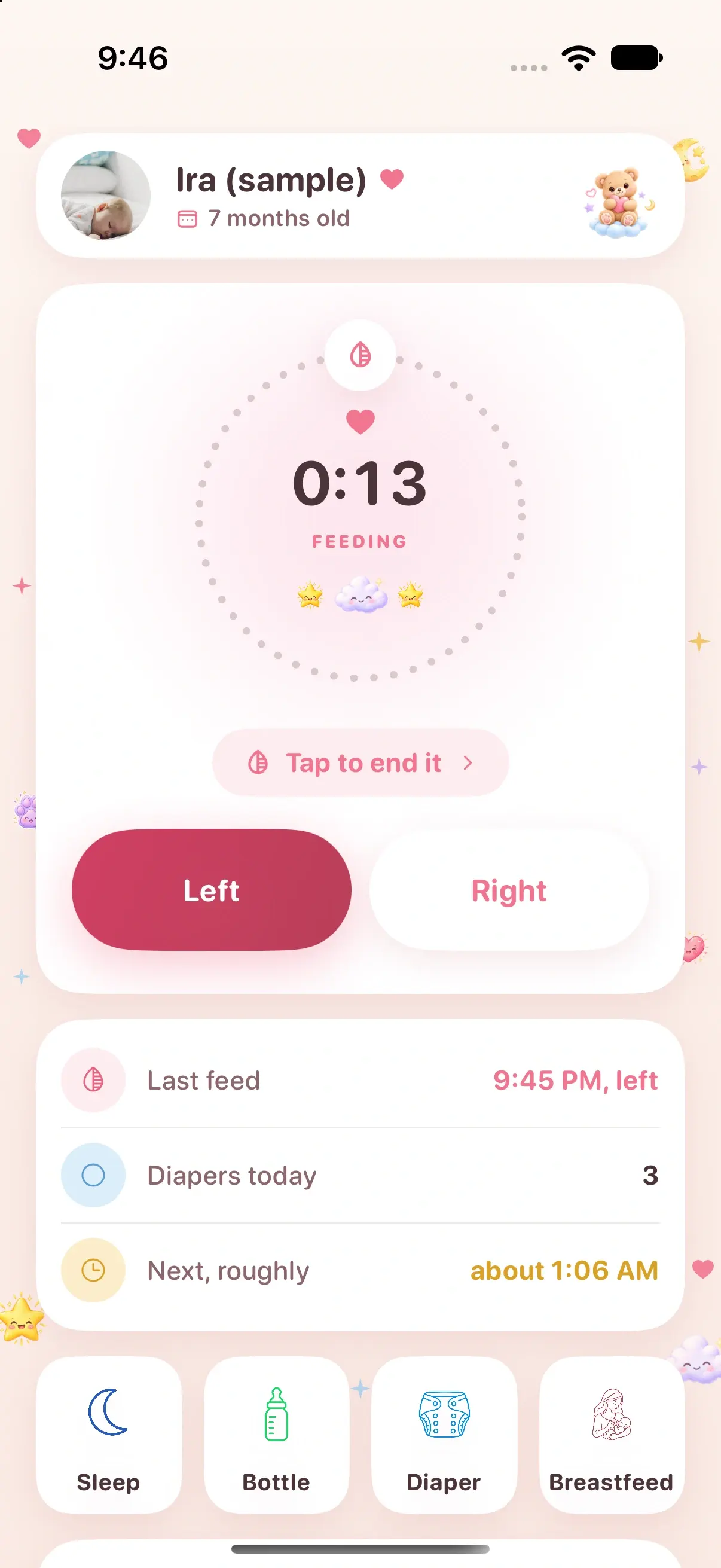
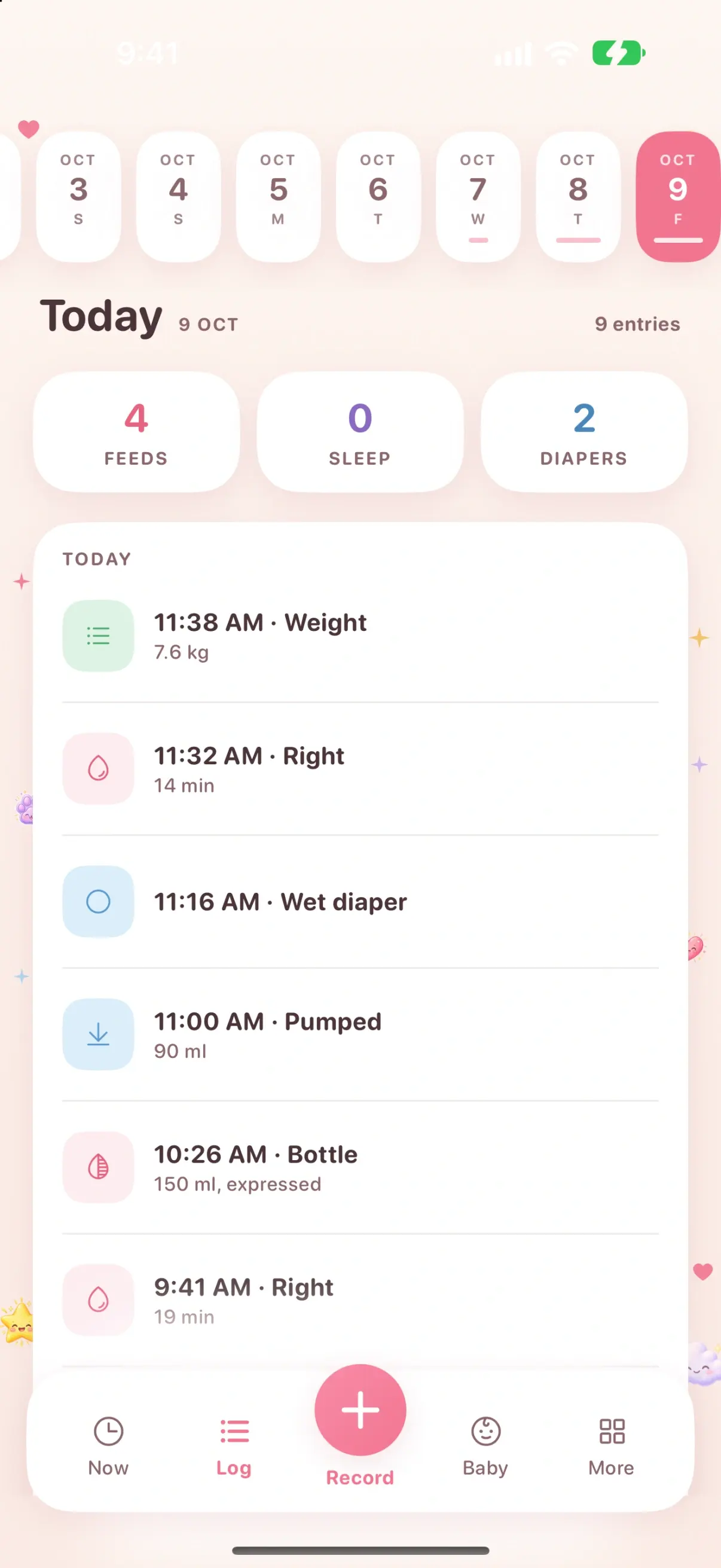
For breastfeeding, the side matters as much as the time, and it is the first thing a tired partner forgets. Zen Otto times breastfeeding on either side with Left and Right on the Now screen, and the Today timeline labels each feed with its side. Bottles carry the amount in milliliters or ounces and whether it was formula or expressed milk.
Set the unit once and agree on it. Milliliters and ounces are easy to mix up when one partner thinks in each, and a shared log with both is hard to read at a glance. Our guide to keeping a feeding, diaper and sleep log covers setting up each entry type.
The handover at shift change
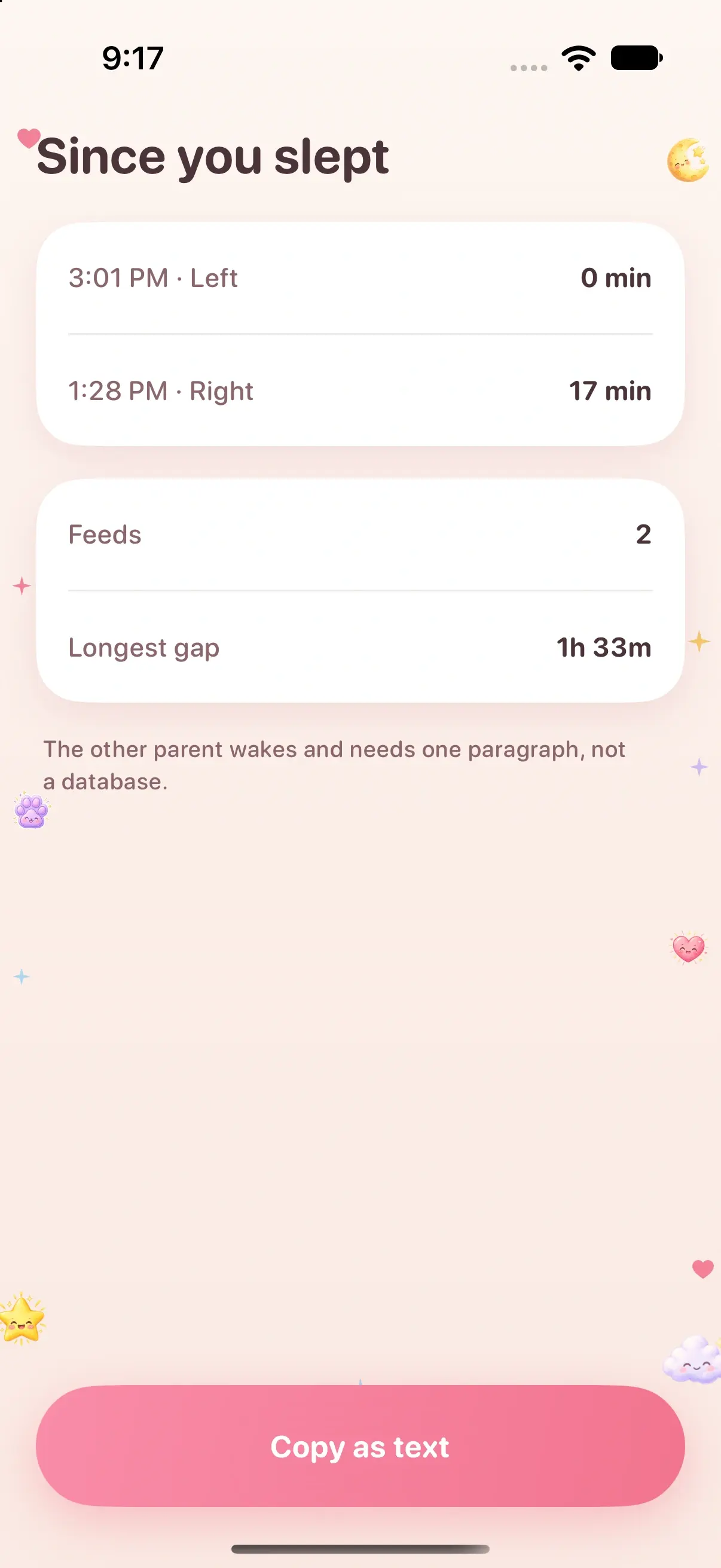
If you split the night into shifts so each of you gets a longer stretch of sleep, the handover is where a shared log earns its keep. Zen Otto has a handover screen that summarizes recent care for whoever is taking over, so the incoming parent reads it instead of waking the outgoing one.
A handover that takes under a minute:
- Outgoing parent: end any running feed or sleep timer before handing over.
- Incoming parent: open the handover screen for recent care, and check the last feed and today’s diapers on the Now screen.
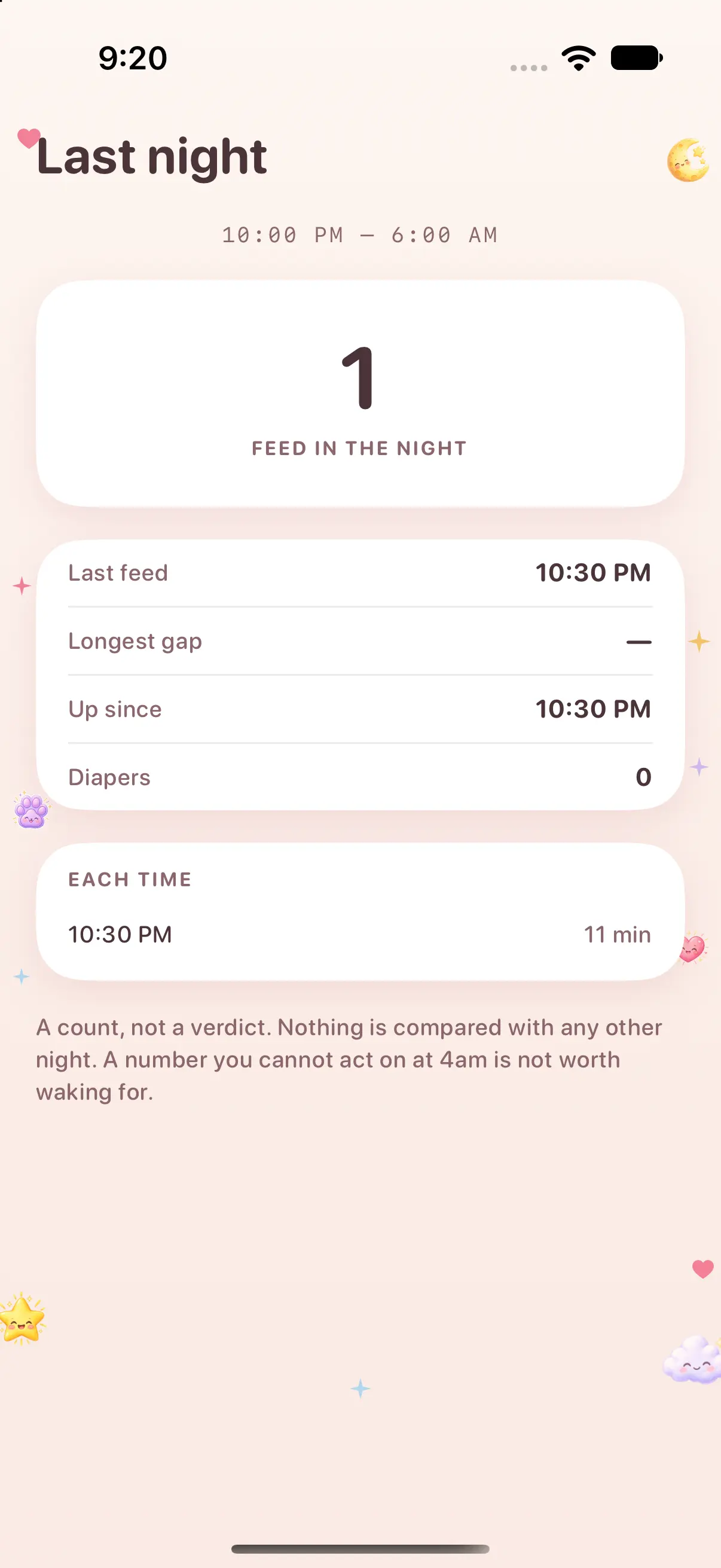
- Check Last night if you want the shape of the night: the feeds, how long each lasted and the longest gap.
- Anything unusual, such as a medicine or a temperature reading, gets its own entry rather than a spoken note that will be forgotten.
Grandparents, nannies and twins
Caregiver sharing is not limited to one partner. You can invite a grandparent or a nanny the same way, as long as they have an iPhone signed in to their own Apple Account. Invite only people you mean to give access to the care records, because they see the baby’s log you share with them.
With twins or siblings, each baby has a separate log. Check which baby is selected before logging; it is the most common cause of a feed landing in the wrong record.
When the shared log does not update
If entries stop appearing on the other phone, work through these in order:
- Confirm which feature you are relying on. Your own second device uses iCloud sync; your partner’s phone uses the caregiver share.
- Check both phones are signed in to iCloud and online. CloudKit delivers sync and sharing updates through Apple’s services, so a phone in airplane mode will catch up later.
- If you just changed the iCloud sync setting, quit and reopen Zen Otto. The change takes effect on the next launch, and the iCloud settings screen shows whether sync is currently running.
- Check the share still exists in the baby’s sharing controls. If it was stopped, invite your partner again.
Privacy: what the other person sees, and how to stop sharing
A caregiver you invite sees the log of the baby you shared, including any photos you attached to it. There is no Zen Otto account and no Zen Otto server that receives your care records; the share runs through CloudKit on Apple’s infrastructure. Usage analytics are on by default in versions that include them, report app actions without the contents of your records, and can be turned off in Settings.
To stop sharing, use the baby’s sharing controls. Three details catch people out:
- Stopping a share does not delete your own private iCloud copy.
- It cannot pull back records the other person already exported or copied outside the app.
- Deleting Zen Otto from your phone does not end a share or remove iCloud copies. Stop sharing in the app first.
To remove Zen Otto data from iCloud afterwards, Apple’s guide to managing iCloud storage shows the path: Settings, your name, iCloud, then Manage Account Storage. Export anything you want to keep first. The full detail is in the Zen Otto privacy policy.
How other baby trackers share with a partner
Most popular trackers use their own accounts and invites. Zen Otto uses iCloud and has no account of its own. Here is how each one adds a second caregiver, checked against each developer’s own site and App Store listing on 14 November 2026.
Scroll sideways to compare every column.
How a second caregiver joins, as of 14 November 2026. Sources: each developer’s help pages and App Store listing.
| App | How a partner joins | Account needed | Android |
|---|---|---|---|
| Zen Otto | Invite to a baby’s log through iCloud sharing | Each person’s own Apple Account; no app account | No |
| Nara Baby | Invite by email from the Family tab; invitee gets full access | A Nara account for each person | Yes |
| Baby Connect | Add Parent/Caregiver by email; invitee creates an account or uses the invitation code | A Baby Connect account for each person | Yes |
| Baby Tracker (Nighp) | Each device joins one sync group with the same email and password | One shared sync-group login | Not checked |
| Huckleberry | Help center describes sharing the account with a partner through an email login | A Huckleberry account | Yes |
Nara’s FAQ says one payment covers the whole caregiver circle, only the account that created the family can remove caregivers, and the app goes read-only for everyone if that subscription lapses. Baby Connect’s support page sets no limit on caregivers per child and also offers a web app, useful for a daycare or a grandparent on a laptop. Nighp’s Baby Tracker FAQ has you create a sync group on its Baby Tracker Server and disconnect under Settings, Sync Data between Devices. Huckleberry’s tracking page lists device sync for caregivers on its Free plan, and its help center covers sharing an account with a partner by email login.
Choose one of those if a caregiver uses Android, if you want a web app, or if you would rather manage access through a vendor account. Choose Zen Otto if everyone who logs is on iPhone, you want no extra account to create, and you want the records held on your phone and in iCloud.
What Zen Otto costs
Zen Otto is free to download, and a plan is required after setup: a monthly or yearly subscription, or a one-time purchase. Eligible subscriptions include a three-day free trial; the one-time purchase has no trial and does not renew. Apple shows eligibility and the local price before you pay. If a subscription ends, your logged records are not deleted. See the screens on the Zen Otto app page or the current offer on the App Store.